
Know who is off before you say yes.
Time-off requests scattered across email threads and spreadsheets make it hard to know who's actually away, and when. FlexManager's Time Off and Leave module centralizes requests and approvals, syncs with Time and Attendance to keep rosters current, and shows a live calendar so resourcing decisions never rely on guesswork.
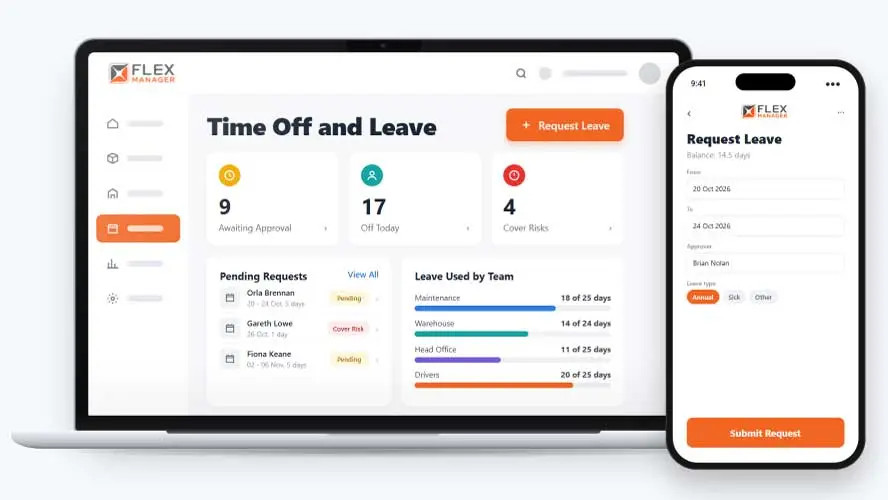









If your leave requests are scattered across email and paper, they will be easy to lose and difficult to keep track of. It can mean that approved time off doesn’t always reach the roster, entitlements are tracked by hand, and there’s no single view of who’s away. The result is often uncovered shifts, confusion, and overpayments.
Email and spreadsheet leave
Requests sit in inboxes, and nobody can see who else is already off.
Blind approvals
A request is approved without knowing the same team, or the only qualified person, is away.
Balances worked out by hand
Allowances are calculated manually, and the numbers are disputed at payroll time.
From request to cover
One request sets approval, balance, and cover in motion, so the decision is made with the full picture.
Request
Staff can request leave on the web or in the mobile app, and the days are held against their balance.
Decide
The approver can see who else is off and which qualifications lose cover, then approves or rejects.
Cover
While approved leave is underway, new work for the absent person goes to a delegate.
Follow up
Supervisors track the team on one board, giving them oversight of the state of play for the team.
Key features & benefits
Individual Overview
Employees request leave from their own portal, while managers get a straightforward overview of the whole team's time off in one place.
Central Approval Process
Every request captures the relevant documentation upfront and routes to managers for approval, syncing with Time and Attendance to keep rosters current.
Location Calendar
See a comprehensive calendar of approved leave for each location, making it easier to plan resourcing around who's actually away.
Conflict Prevention
Spot potential scheduling conflicts before they happen, since every approved or pending request is visible in one shared view.
Transparent Employee Experience
Give employees a clear, user-friendly way to request and track their own leave, rather than chasing an answer over email.
See Time Off and Leave in action.
Bring a real case to the demo. We will build it live.
Built for the teams who plan around leave
From HR to the team supervisor, everyone works from the same leave record.
HR Manager
Can spot absence patterns with the Bradford Factor; prompts a return-to-work interview after an absence.
Operations Manager
Sees who else is off before approving, and is able to book shutdown days as approved leave for whole regions.
Team Supervisor
Can cancel a leaver's future leave and credit it back.
Operatives
Has agency over submitting leave requests, online or through the mobile app.
Onboarding built around your needs. We're ready when you are.
We work to your pace and your team's availability. Your dedicated onboarding specialist takes care of the setup, so getting started stays simple.
Configuration
We configure FlexManager around your procedures.
Training
Short, role-based sessions for admins and field teams. Most users are confident after their first use.
Go Live!
Start with one site or roll out everywhere at once. Your account manager stays with you after launch.
Get started with Time Off and Leave

Frequently Asked Questions
What is FlexManager's Time Off and Leave module?
Time Off and Leave is FlexManager’s module for managing employee leave requests, approvals and entitlements in one centralized place. It syncs with Time and Attendance to keep rosters current, shows a live calendar of approved leave by location, and connects to Location Management, Analytics and Employee Profile.
How do employees request time off?
Employees submit a request through their own personal portal, with any relevant documentation captured as part of that initial request. The request then routes to a manager for approval, giving managers a straightforward overview of the whole team’s time off rather than requests scattered across email.
How are collective holidays or shutdowns handled?
Collective holidays and shutdowns can be configured and managed centrally through the Entitlement Manager, so they’re applied consistently rather than tracked manually for each employee. This reduces the confusion or overpayments that can happen when entitlements aren’t recorded accurately in one place.
Does Time Off and Leave affect rosters and attendance?
Yes. Time Off and Leave links to Time and Attendance, so approved leave is reflected directly in rosters rather than requiring a separate manual update. This helps keep scheduling and attendance records aligned with who’s actually approved to be away.
Can I see a calendar of approved leave by location?
Yes. A location calendar shows a comprehensive view of approved holidays for each location, making it easier to plan resourcing around who’s actually away. Rather than checking individual requests one by one, managers can see availability across a whole site at a glance.
How does the module help prevent scheduling conflicts?
Because every approved or pending request is visible in one shared view, potential scheduling conflicts can be spotted before they become a problem. This gives managers a clear overview of the team’s leave schedule, helping avoid the double-booking that comes from requests being tracked separately.
Why choose FlexManager for Time Off and Leave?
FlexManager has helped HR teams manage leave and workforce entitlements since 2011, shaped by people who understand that a mishandled leave balance is a payroll problem as much as an HR one. FlexManager is certified to ISO 9001, ISO 14001, ISO 27001 and ISO 45001 certification, and it’s that ISO 9001 quality-management discipline that shapes how Time Off and Leave tracks entitlements, so collective holidays and shutdowns are recorded accurately rather than left open to confusion or overpayment.