
Incident reporting that fits your way of working.
A seamless way to help you capture incidents, track corrective actions, and promote a culture of learning. You'll need this module if you want to have a way to capture incidents instantly and route them through the correct channels so that you can reduce the likelihood if them happening again.
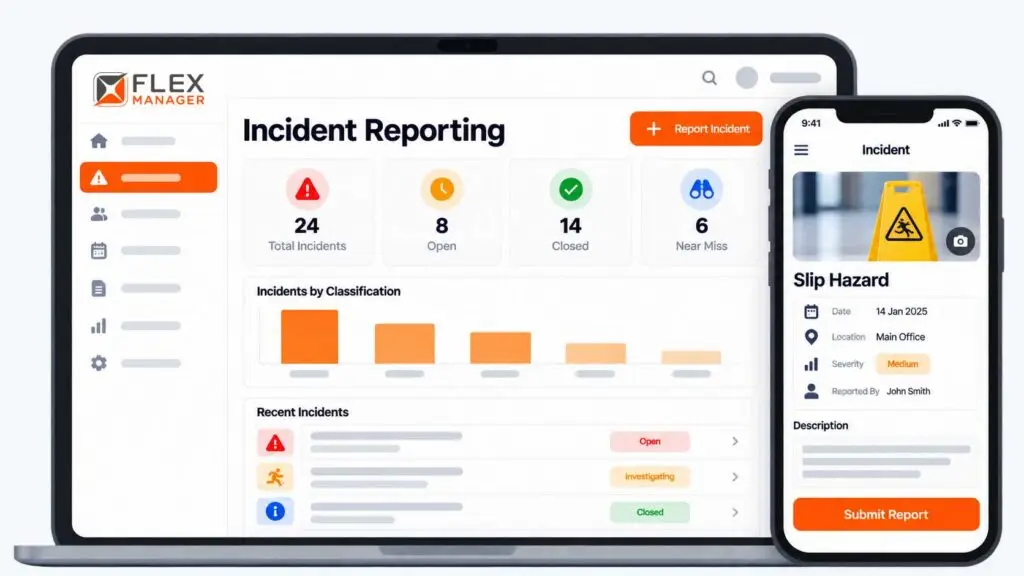
When your incidents happen, do you have a way to document them, record evidence, and keep track of whether they were ever learned from or not? If you’re not able to answer this, you have a challenge on your hands. Not having the incident digital trail you need means no lessons to carry forward and it leaves you unprepared for an audit.
SILOED DOCUMENTS
Reports scattered across inboxes, drives, and spreadsheets.
PHYSICAL FORMS
Paper that gets filled in late, lost, or never at all.
ACTIONS THAT STALL
Follow-ups agreed in the meeting that never took off.
Key features & benefits
Built for people on site and the people reviewing from the office, at the same time.
MOBILE-TO-DESKTOP
Log incidents as they arise on mobile, while desktop users are kept in the loop.
REVIEW PROCESS
Standardise your review approach to help ensure consistency across all incident types.
CORRECTIVE ACTIONS
Identify, assign, and track follow-up actions to prevent re-occurrence.
REPORTING & ANALYTICS
Generate detailed, structured reports to support internal analysis.
INCIDENT TYPES
Categorise incidents to streamline investigations and spot trends early.
From event to insight
Every report follows a structure you set, so nothing is missed between the incident and the lesson learned.
CAPTURE INSTANTLY
Record by photo, video, or written testimony, with no delay to the investigation.
REVIEW CONSISTENTLY
A clear, structured workflow helps standardise every investigation.
ACT & VERIFY
Assign corrective actions, track them, and verify them to close the incident.
Transform what incident reporting means to you.
Bring a real case to the demo. We will build it live.
One system, everyone on the same page.
From the person who spots the hazard to the person who signs off on the fix
Health & Safety Managers
Run consistent investigations and walk into audits with a complete trail.
Site Supervisors
Log an incident from a phone in minutes, with photos.
HR & People Teams
Link incidents to employee profiles, injuries, and any insurance claims.
Operations Leaders
See trends across sites and know which actions are still open.

How Doyle Shipping Group built a safer workplace
See how our Incident Reporting module helped DSG increase the number of incidents logged, create actions that changed outcomes, and ultimately build a safer workplace.
Enter it once, see it everywhere.
An incident links straight to the people, injuries, and claims involved, so nobody re-keys the same facts into multiple systems.
Explore all modules →Onboarding built around your needs. We're ready when you are.
We work to your pace and your team's availability. Your dedicated onboarding specialist takes care of the setup, so getting started stays simple.
Configuration
We configure FlexManager around your procedures.
Training
Short, role-based sessions for admins and field teams. Most users are confident after their first use.
Go Live!
Start with one site or roll out everywhere at once. Your account manager stays with you after launch.
Get started with Incident Reporting










Frequently Asked Questions
What is incident reporting software?
Incident reporting software provides a structured digital system for recording, reviewing, and tracking workplace incidents. FlexManager enables teams to capture events in real time, categorise incidents, follow a consistent review process, assign corrective actions, and analyse incident data to identify recurring safety trends.
How does FlexManager Incident Reporting work?
FlexManager provides a structured process from initial incident capture through review and corrective action follow-up. Incidents can be logged as they arise, categorised by type, and reviewed through a consistent workflow, while associated actions can be assigned and tracked through to completion.
Can incidents be reported from mobile devices?
Yes. FlexManager supports mobile-to-desktop incident reporting, allowing incident information to be captured when events occur and made available to desktop users involved in the review and follow-up process. This helps connect teams working in the field with those managing safety processes from the office.
Can photos and videos be added to incident reports?
Yes. FlexManager allows incident information to be supported with photos, video, or testimony. Capturing this information close to the time of the event can provide additional context for teams reviewing what happened and determining the appropriate next steps.
Can FlexManager track corrective actions after an incident?
Yes. Corrective actions can be identified, assigned, and tracked following an incident. This gives teams visibility over the actions resulting from a review and helps ensure that follow-up activities remain connected to the incident that prompted them.
Can different types of incidents be recorded?
Yes. FlexManager allows incidents to be categorised by type, helping organisations maintain more structured incident records. Categorisation also makes it easier to analyse incident data, identify commonalities, and recognise recurring issues that may require preventive action.
Can FlexManager standardise our incident review process?
Yes. The Incident Reporting module is designed to support a consistent and structured review approach across incident types. Organisations can establish a defined reporting structure so teams have greater clarity around how incidents should be recorded, reviewed and followed through.
Can incident data be used to identify safety trends?
Yes. FlexManager provides reporting and analytics capabilities that help organisations examine incident types, recurring issues, and common patterns. This gives safety teams greater visibility over their incident data and can support more informed preventative safety decisions.