
Track your tasks through to closure.
A job request that lands in an inbox and gets forwarded around isn't being tracked, it's being passed along. FlexManager's Work Orders module tracks every task from creation through assignment, progress, and closure, across every project and location, so nothing depends on someone remembering where it was left.
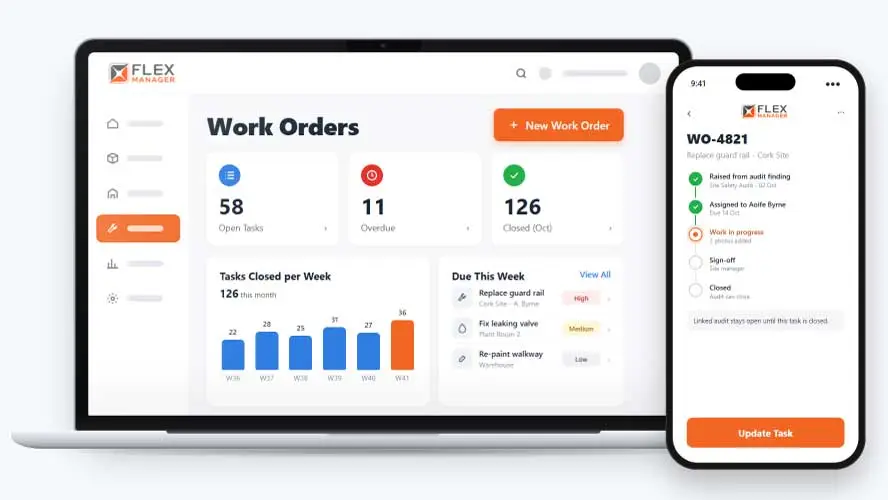
How many jobs on your list are already overdue, and how many are the same problem reported twice? When deadlines are tracked separately from the jobs themselves, urgent work slips past its due date and duplicate reports clutter the list until no one is sure which job is the real one.
Requests in inboxes
Jobs arrive by email, phone and corridor chat, and some are not written down at all.
Hand-offs by memory
One trade finishes and the next hears about it days later, if they hear at all.
Deadlines nobody owns
Due dates are whatever someone typed, and late work only surfaces when somebody complains.
Key features & benefits
Incidents Close at a Certain Point
With Incident Reporting, incidents stay open until their jobs close; helping ensure that incidents are dealt with before they can be put out of sight.
Merge
Merge duplicate requests into one job, history and files included.
Raise a Job by Email
Emails to your helpdesk inbox become jobs; replies become comments.
From request to sign-off
A job is raised once, picks up its due date from its category, and moves from stage to stage until it is closed.
Request
Raise a job from an incident, audit, inspection, or risk; recurring jobs raise themselves with their checklist attached.
Plan
Break a job into checklist steps and promote any step; due dates default from each category and the job's priority.
Hand off
Completing one stage hands the job to the next owner
Follow up
Overdue jobs can be reminded about, reassigned, or closed.
See Work Orders in action.
Bring a real case to the demo. We will build it live.
Support for every type of interest in a job
From the person who reports a fault to the person who signs the job off, everyone works from the same record.
Facilities Manager
Knows that confidential jobs stay out of other people's lists and searches
Maintenance Supervisor
Can see open jobs on a map and a calendar, offering insights that could prove useful.
HSEQ Manager
Can raise corrective jobs from incidents, audits, and inspections; with Incident Reporting, the incident stays open until they are done.
Contractor
Contractors can see their company's jobs in the external portal.

Mater Private Cork
Since 2014, the Mater Private Cork have been using the FlexManager solution. Digital audits conducted on FlexManager were integrated for audit efficiency, work order tracking, and communication. This helped ensure compliance and timely corrective actions were undertaken, without the need for paper.
Onboarding built around your needs. We're ready when you are.
We work to your pace and your team's availability. Your dedicated onboarding specialist takes care of the setup, so getting started stays simple.
Configuration
We configure FlexManager around your procedures.
Training
Short, role-based sessions for admins and field teams. Most users are confident after their first use.
Go Live!
Start with one site or roll out everywhere at once. Your account manager stays with you after launch.
Get started with Work Orders










Frequently Asked Questions
Can people outside our organization submit a work request?
Yes. Outsiders can submit requests without needing a login, and tasks can also be raised by email straight into the system. Both routes create a trackable job the same way a request logged directly in FlexManager would.
What happens if a job is about to run overdue?
You’re alerted before it runs overdue, based on the due date set for its priority and category, so a deadline being missed doesn’t come as a surprise. If the job is still open when it’s overdue, it stays visible rather than dropping out of view.
Can sensitive jobs be kept private from staff who shouldn't see them?
Yes. Sensitive jobs can be hidden from unauthorised staff, so a job dealing with something confidential isn’t visible to everyone with general access to the work order list, while still being tracked through the same workflow as any other job.
Why choose FlexManager for work orders?
FlexManager has been helping organizations manage work across projects and sites since 2011, with hands-on HSEQ experience. FlexManager is certified to ISO 45001, ISO 9001, ISO 14001, and ISO 27001, and it’s that industry-backed accreditation that gives us the know-how we need.