
Control your inventory in a few clicks.
A kit that's supposed to have twelve items can quietly lose one for months before anyone notices. FlexManager's Equipment Inventory Check module can help you run periodic stock-takes from a phone or the web. It shows anything confirmed, removed, or added, plus it can be used to move items found elsewhere to the project they actually belong to.
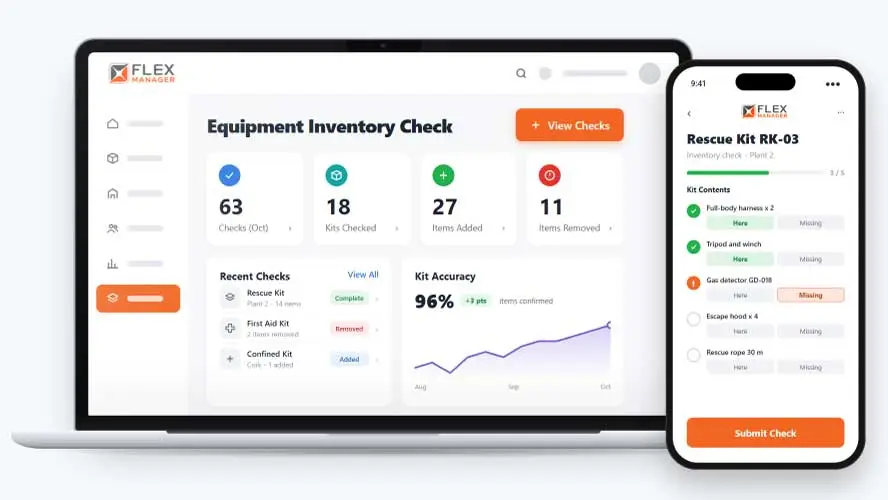
Kits, toolboxes, and equipment sets rarely stay as they were issued. Items get borrowed, lost, swapped, or added, and the official list doesn’t change with them. Stock-takes are done on paper or in spreadsheets; missing items aren’t noticed until they’re needed, and nobody can say when or where they went.
Paper tick-lists
Ticked on a clipboard, left in a cab, and gone by the time someone asks.
Kits that drift
Items swap between trailers and vans until no list matches what is on board.
Losses found late
A missing item is noticed at the next job, not on the day it went.
Key features & benefits
Kit Item Audit
Audit which items are still present in a kit, so a stock-take checks against what should actually be there, not just what's easy to see.
Auto-Reassignment
Items found elsewhere are moved to the right project automatically, rather than staying logged against a project they've actually left.
Unaccounted-For Item Report
Unaccounted items report shows what left a kit, with its value.
From kit list to count
A kit is an asset with items in it. Each check compares what was found with what the kit should hold.
Build the kit
Add items to a kit from its asset profile or straight from an asset search.
Check it
Send the check by mobile upload or through the REST API, marking what is there.
Reconcile
Each item is confirmed, removed, or added; found items join the kit and its location.
Review
The kit owner can be alerted when a check is completed, and the counts and items sit on the check and the kit's history.
See Equipment Inventory Check in action.
Bring a real case to the demo. We will build it live.
Built for the teams who rely on equipment inventory checks
Plant, stores, and site teams work from the same record of what each kit holds and what changed.
Plant and Equipment Manager
Sees each kit's checks across locations with their counts, and exports or reports on what was added or went missing.
Stores Supervisor
Kit lists correct themselves as found items join the right kit and transfer to its location.
Depot Manager
As the kit's owner, can be alerted when a check is done.
Asset Controller
Can optionally take missing items off the kit as the check ends.

Galway Fire Service
FlexManager presented a means of digitising inspections and audits, reducing the time needed to record and also locate key information relating to their fleet. All issues, actions, and resolutions are captured in a single record, with a consistent format outlined for audits and vehicle inspections to ensure all bases are covered.
Onboarding built around your needs. We're ready when you are.
We work to your pace and your team's availability. Your dedicated onboarding specialist takes care of the setup, so getting started stays simple.
Configuration
We configure FlexManager around your procedures.
Training
Short, role-based sessions for admins and field teams. Most users are confident after their first use.
Go Live!
Start with one site or roll out everywhere at once. Your account manager stays with you after launch.
Get started with Equipment Inventory Check










Frequently Asked Questions
What is FlexManager's Equipment Inventory Check module?
Equipment Inventory Check is FlexManager’s module for running stock-takes of equipment kits. It audits which items are still present, shows what’s been confirmed, removed or added, moves items found elsewhere to the right project, and keeps a full history of every check per asset.
What happens when an item from a kit is found somewhere else?
If an item from one kit turns up somewhere else, it’s moved to the right project automatically rather than staying logged against a kit it’s actually left. This keeps records accurate without needing someone to manually track down and correct every misplaced item by hand.
Can I see the full check history for an asset?
Yes. An asset’s full check history is available directly on its profile, so past stock-takes don’t need to be tracked down separately. Past checks can also be searched and exported, making it easy to review results or share them outside the system.
Why choose FlexManager for equipment inventory check?
FlexManager has helped equipment and plant teams track kit contents since 2011, aware that a missing item is far easier to explain the week it goes missing than months later. FlexManager is certified to ISO 9001, ISO 14001, ISO 27001 and ISO 45001 certification, and it’s that industry-backed accreditation that gives us the know-how we need.