
Communications targets the people that matter, in a way that works.
A critical alert buried in an inbox no one checks might as well not have been sent. FlexManager's Communications module reaches people by email, text, or WhatsApp, fires automatically when the right event happens, and keeps every user's live notification panel and message history up to date.
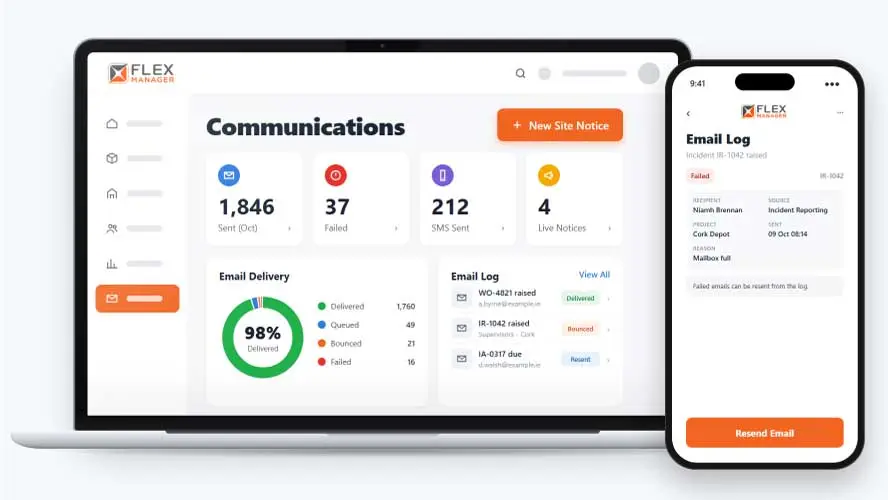
Information overload can cause people to disengage from your messaging. On the flipside, workers need to stay abreast of key updates. Plus, you also have to contend with people moving around the business. You need a way to streamline your communications while keeping your workforce up to speed.
Lists that go stale
People change sites and roles, but the distribution list still carries last year's names.
Copied on everything
Managers receive every site's news, stop reading it, and the urgent one is missed.
Nobody knows who heard
When an email bounces or sits unread, nobody finds out until it matters.
Key features & benefits
Multi-Channel Messaging
Reach people by email, text, or WhatsApp, so a message actually gets seen instead of sitting unread in one inbox.
Live Notification Panel
Every user can see a live notification panel, so nothing important gets missed because a message got buried elsewhere.
Send Window
Set a send window that you've chosen so that your notifications are held until that time.
From event to the right inbox
Each module raises its events; Communications decides who hears about them, how, and keeps the record.
Choose recipients
Pick roles and named people for each event, narrowed to the record's project; the screen shows what triggers it.
Decide how you send
Send emails for events; where your licence allows, send SMS.
Deliver
Each person gets one email per event with the details filled in.
Track
Every email is logged with its status and any failure reason; failures are retried, then can be resent.
See Communications in action.
Bring a real case to the demo. We will build it live.
For those who want to build solid communications
From the safety team to IT, every team can have a reason to share important updates to larger groups or key individuals.
Head of HSEQ
Can use this module to post site notices by project or category, with an expiry date.
Administrators
Can confidently send SMS on behalf of leadership; dead mobile numbers cleared from profiles, with an audit note.
Site Manager
Knows that unsubscribing turns off one notification, not all of them, helping ensure alerts don't get missed.
Offsite workers
Are kept in the loop with WhatsApp messages on key events.
Onboarding built around your needs. We're ready when you are.
We work to your pace and your team's availability. Your dedicated onboarding specialist takes care of the setup, so getting started stays simple.
Configuration
We configure FlexManager around your procedures.
Training
Short, role-based sessions for admins and field teams. Most users are confident after their first use.
Go Live!
Start with one site or roll out everywhere at once. Your account manager stays with you after launch.
Get started with Communications










Frequently Asked Questions
What is FlexManager's Communications module?
Communications is FlexManager’s module for reaching people by email, text, and WhatsApp. It processes event-driven alerts automatically, gives every user a live notification panel, sends automated reminders, and keeps a record of every message sent across the platform.
How are alerts triggered?
Alerts can be tailored so specific events trigger specific alerts, meaning a relevant event fires a message automatically. Reminders are sent the same way, without anyone needing to manually trigger them each time.
Can I control which messages I receive?
Yes. People can opt out of messages they don’t want to receive, so notifications stay relevant rather than becoming noise. A live notification panel also lets each user see what’s actually been sent to them, in one place, at any time.
Why Choose FlexManager for communications?
FlexManager has handled safety-critical and operational communication since 2011, from a team that understands what it means when an alert genuinely needs to reach someone right away, not just when it’s convenient. FlexManager is certified to ISO 9001, ISO 14001, ISO 27001 and ISO 45001 certification, and it’s that industry-backed accreditation that gives us the know-how we need.