
One profile, per subcontractor worker, to track compliance.
A subcontractor workforce that's only tracked at company level misses the detail that actually matters. FlexManager's Subcontractor Employee Profile module holds a profile for each worker employed by a subcontractor company, covering their site assignment, training records, ID card, and CV, all in one place.
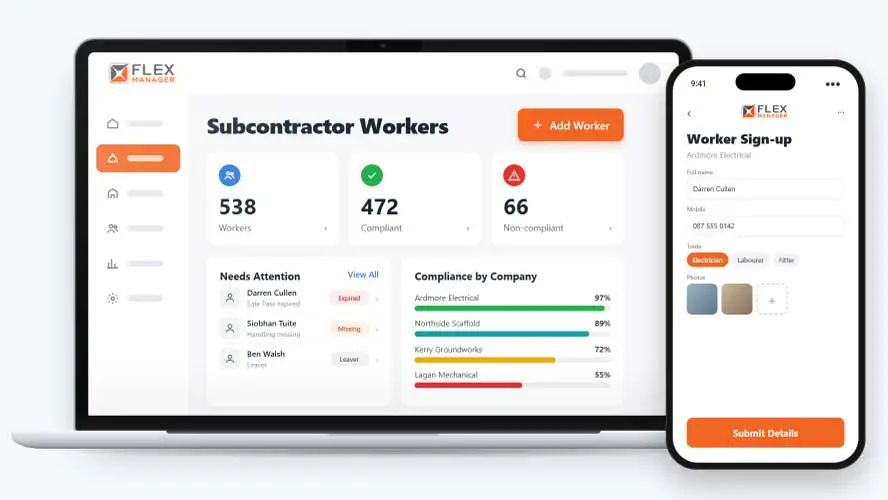
If an incident or audit comes up months later, can you say for certain which workers were on that site and whether their training was valid at the time? Collecting each worker’s details usually means paperwork and data entry on the morning they arrive, which holds up the start of work. Over time, nobody keeps a reliable record of who worked on which site, and that can create problems for everyone.
Certificates by email
Photos of tickets sit in inboxes, and nobody can say which ones have run out.
A list for every site
Each site keeps its own spreadsheet of contractor workers, and none of them agree.
Leavers left live
When a worker moves on, their login and their door pass quietly stay live.
Key features & benefits
One Profile, Every Worker
Hold a profile for every subcontractor worker, so each individual is tracked properly rather than being lumped in under their company's name alone.
Workers' Details
Choose which details workers can update themselves, allowing them to take autonomy in keeping records up to date.
Get Alerted When Compliance Fails
Be alerted when a worker's compliance check fails, so a lapsed requirement is flagged straight away rather than being noticed only when it's already caused a problem.
From sign-up to leaver
One profile follows each subcontractor worker from the day they register to the day they leave.
Sign up
Workers sign up from their company's link or QR code; they upload their own certificates when they register.
Set rules
Require a course or an induction per subcontractor type
Daily check
A daily check flags missing or expired training; hard failures alert the subcontractor and your coordinator.
Deactivate
One click removes a leaver's login and site permissions, and door access with Access Control.
See Subcontractor Employee Profile in action.
Bring a real case to the demo. We will build it live.
Built for admins and site teams
From the safety team to the site gate, everyone works from the same record of each contractor worker.
HSEQ Manager
Sets the training each subcontractor type needs, and finds workers by course.
Site Manager
Is able to see a compliance status for each worker on the list.
Subcontractor Coordinator
Imports, merges, and moves workers between companies, and is alerted when one fails a hard rule.
Access Control Lead
Deactivates leavers so their login, site permissions, and door access end.
Onboarding built around your needs. We're ready when you are.
We work to your pace and your team's availability. Your dedicated onboarding specialist takes care of the setup, so getting started stays simple.
Configuration
We configure FlexManager around your procedures.
Training
Short, role-based sessions for admins and field teams. Most users are confident after their first use.
Go Live!
Start with one site or roll out everywhere at once. Your account manager stays with you after launch.
Get started with Subcontractor Employee Profile








Frequently Asked Questions
What happens when a worker's compliance check fails?
You’re alerted the moment a worker’s compliance check fails, so a lapsed requirement, such as an expired certificate, is flagged straight away. The check reflects what’s been recorded and reviewed in the system, so keeping requirements genuinely up to date still depends on your own process.
Can a worker move between subcontractor companies without losing their record?
Yes. A worker can be moved between companies while keeping their history intact, and if they leave and later return to a company, they can simply be re-activated rather than being set up as a brand new worker.
What if the same worker ends up with more than one record?
Duplicate worker records can be merged into one, so a worker who was accidentally entered twice, perhaps under a slightly different name, ends up with a single, accurate profile rather than two partial ones.
Why choose FlexManager for subcontractor employee profile?
FlexManager has been building workforce and safety software since 2011, with hands-on HSEQ experience behind the team, not just software developers. FlexManager is certified to ISO 9001, ISO 14001, ISO 27001 and ISO 45001 certification, and it’s that industry-backed accreditation that means we have the know-how we need.