
Turning bulletins into targeted messages that work for you.
Not every announcement matters to every worker, and broadcasting all of them just trains people to ignore your messages. FlexManager's Employee Bulletins module targets updates by site, team, or individual, pushes urgent alerts instantly, and tracks who has acknowledged each one, so nothing important gets lost in the noise.
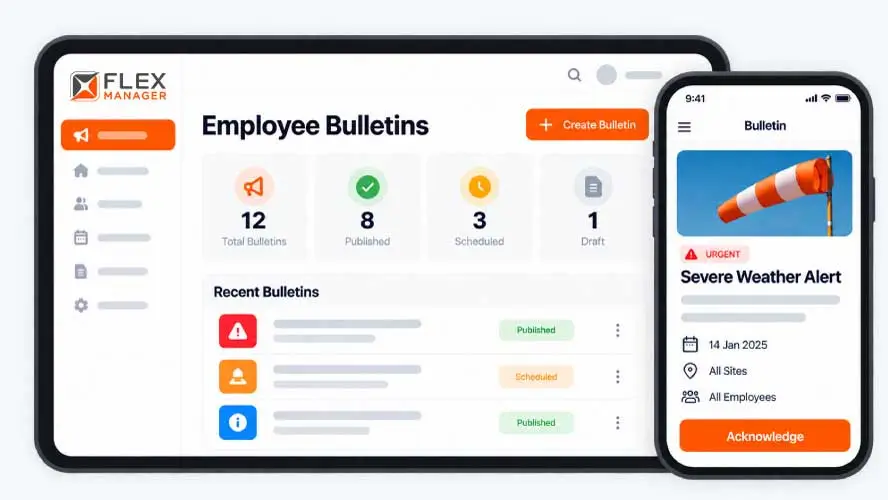
Company-wide emails and noticeboard posts go to everyone, so the updates that matter to a particular site, team or role get lost among the ones that don’t. Once a message is out, there’s no clear record of who has seen it. A new policy, a safety notice, or a change to working practices could be ignored, and you’d only find out when something goes wrong.
Sent is not read
The notice goes to everyone, and nobody can say who opened it until something goes wrong.
Sign-off on paper
Read-and-sign sheets for a new rule are chased round the sites and typed into a spreadsheet.
No desk, no email
Site and field staff hear about changes by word of mouth or a group chat on a personal phone.
Key features & benefits
Mobile-to-Desktop Delivery
Field teams can receive bulletins straight to their mobile device, with acknowledgement relayed back to desktop users, so office-based managers see who's opened without chasing anyone down.
Targeted Distribution by Site, Team, or Individual
Filter messages so that a bulletin only reaches the people it's actually relevant to, rather than broadcasting it to the whole workforce.
Instant or Scheduled Announcements
Push urgent updates instantly, whether it's a weather warning or a road closure, or schedule routine communications in advance so they go out at the right moment automatically.
Read & Acknowledgement Tracking
You can see whether a recipient has opened a bulletin, giving a clear trail of who has actually seen the message rather than just who it was addressed to.
Impact-Based Targeting
Only the people actually affected by an announcement are notified, so they can adjust what they're doing straight away, without adding noise for staff the update doesn't concern.
Central, Traceable Communication Hub
Send updates, warnings, or day-to-day notices through one central system built to get a message out fast, with a traceable record of who received and acknowledged it.
From notice to read receipt
One bulletin carries its audience, its delivery window, its reaction buttons, and reports back on every person it reached.
Write
Start from a category that pre-fills the text and reaction buttons; sets the colour and prefix.
Target
Choose projects, groups, user roles, or a map area, and preview who the bulletin will reach.
Send
Set a start time; texts staff instead of email where your licence includes SMS.
Track
See who has opened each bulletin and who has no recorded open.
See Bulletins in action.
Bring a real case to the demo. We will build it live.
Built for anyone coordinating a mixed workforce
From head office to the furthest site, everyone sees the same notice and you see who has read it.
Internal Comms Manager
Sends each notice only to the projects and groups it concerns, previews the audience, and can correct it after it goes.
Site Safety Manager
Can send a safety alert with a reaction button and sees who has no recorded open yet.
HR Manager
Runs a quick poll and sees how people reacted with up to five reaction buttons per bulletin.
Operations Director
Reaches field staff without company email by text, where the licence includes SMS.
Onboarding built around your needs. We're ready when you are.
We work to your pace and your team's availability. Your dedicated onboarding specialist takes care of the setup, so getting started stays simple.
Configuration
We configure FlexManager around your procedures.
Training
Short, role-based sessions for admins and field teams. Most users are confident after their first use.
Go Live!
Start with one site or roll out everywhere at once. Your account manager stays with you after launch.
Get started with Bulletins










Frequently Asked Questions
What does FlexManager's Employee Bulletin module do?
It lets managers send targeted announcements to specific sites, teams or individuals, and tracks who has acknowledged each one, so a message going out comes with evidence of who actually received and confirmed it. Updates can be pushed instantly or scheduled in advance, covering everything from urgent warnings to routine policy notices.
Can a bulletin be sent to a specific site or team instead of everyone?
Yes. Messages can be filtered by site, department or individual, so a bulletin only reaches the people it’s actually relevant to. That avoids the noise of sending a site-specific update, like a local access change, to staff at a location it doesn’t affect.
Can urgent updates be sent immediately, or do they have to be scheduled?
Both are supported. Time-sensitive updates, such as a weather warning or road closure, can be pushed instantly across the organisation or to specific personnel, while routine communications like policy updates or company news can be scheduled in advance instead, so they go out automatically at the right moment without anyone needing to send them by hand.
How do I know whether someone has actually seen a bulletin?
Recipients confirm receipt when they open a bulletin, which gives a clear trail of who has acknowledged the message rather than just who it was addressed to. That lets you follow up directly with anyone who hasn’t acknowledged an announcement yet.
Does Employee Bulletin work for field staff as well as office-based teams?
Yes. Field teams receive bulletins on their mobile device, and their acknowledgement is relayed back to desktop users, so office-based managers can see who has responded without physically chasing people down on site, whether that’s confirming a safety alert landed or a policy update was seen.
Can Employee Bulletin be used for more than safety alerts?
Yes. Alongside urgent warnings, it can carry routine updates and everyday notices, such as policy changes or company news, through the same targeted, acknowledgement-tracked system, rather than needing a completely separate channel for communication that isn’t safety-related or time-critical.
Why choose FlexManager for workforce communication?
FlexManager has been building practical compliance software since 2011, with hands-on HSEQ expertise behind every module we build. FlexManager is certified to ISO 9001, ISO 14001, ISO 27001 and ISO 45001 certification. For workforce communication specifically, that HSEQ background shapes why acknowledgement tracking matters here as much as delivery — a safety message only works if you can prove it landed.