
Easily manage your devices, your way.
A lost phone or an old kiosk still connected to your account is a risk sitting in plain sight. FlexManager's Connected Mobile Device Management module can register and manage every linked device, lets you remotely wipe or disable one you no longer trust, and keeps an activity trail for each.
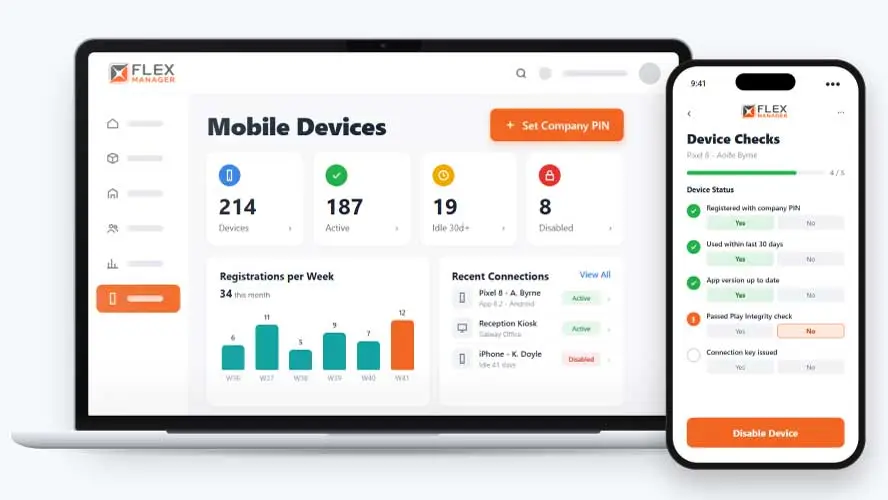
Without a central view, mobile and kiosk devices linked to your account are hard to keep track of. Pairing new ones is clunky, and old or compromised devices can stay connected long after they should have been cut off. Getting content onto a kiosk screen usually means someone has to go to the device. Over time you lose sight of which devices are connected, which ones you can trust, and who is in control of them.
Phones that leave with people
A leaver hands back the badge, but the phone in their pocket still has the app.
No list of devices
Nobody can say which phones, tablets and screens are still connected, or who used them last.
Lost phones
When a phone goes missing, there is no quick way to cut it off.
Key features & benefits
Register & Manage Devices
Register and manage every connected mobile device from one place, rather than tracking phones, kiosks, and displays separately as they're added.
Remote Wipe
Remotely wipe a lost or stolen device, so sensitive data doesn't sit exposed on hardware you no longer physically control.
Device Activity Trail
Keep an activity trail for each device, giving a clear, reviewable record of what's happened on it over time.
From PIN to switch-off
Every phone, kiosk, and display screen goes through the same steps, from joining with your PIN to being switched off.
Register
A phone, kiosk, or display screen can be connected with your company PIN or a one-time password, and gets its own connection key.
See it
The device appears in the connections list with its last user, app version, and recent activity.
Log it
Registrations and enable/disable events are logged against the device, with the time.
Switch it off
You can disable it in one click, or let terminated employees' and idle devices be disabled for you.
See Connected Mobile Device Management in action.
Bring a real case to the demo. We will build it live.
Built for the teams who need device oversight
IT, HR, and the safety team work from the same list of devices that can reach your data.
IT Manager
Sees connected devices with app version and last activity, and disables a lost one in a single click.
HR Manager
Knows an employee's devices are disabled when they are terminated in Employee Profile.
HSEQ Manager
Sees which devices a person last signed in on, with registration date, last activity, and status.
Operations Director
Has a log of each device's registrations and disables when an audit asks.
Onboarding built around your needs. We're ready when you are.
We work to your pace and your team's availability. Your dedicated onboarding specialist takes care of the setup, so getting started stays simple.
Configuration
We configure FlexManager around your procedures.
Training
Short, role-based sessions for admins and field teams. Most users are confident after their first use.
Go Live!
Start with one site or roll out everywhere at once. Your account manager stays with you after launch.
Get started with Connected Mobile Device Management










Frequently Asked Questions
What is FlexManager's Connected Mobile Device Management module?
Connected Mobile Device Management is FlexManager’s module for registering and controlling every mobile and kiosk display linked to your account. It supports remote wipe and remote disable for devices you no longer trust, keeps an activity trail for each one, and pairs new devices with a connection code.
What happens if a device is lost or stolen?
A lost or stolen device can be remotely wiped, so data on it doesn’t stay exposed once it’s out of your control. If you simply no longer trust a device but haven’t lost it, it can be remotely disabled instead, without needing physical access to it.
What types of devices does the module support?
The module supports phones, kiosks, and dashboard displays, registering each one under your account. New devices are paired using a connection code, and devices that have gone unused can be deactivated, so the list of connected devices stays accurate rather than cluttered with stale entries.
Why Choose FlexManager for connected mobile device management?
FlexManager has helped operations and IT teams manage connected devices since 2011, aware that a single lost phone can be a bigger risk than most people realise until it happens. FlexManager is certified to ISO 9001, ISO 14001, ISO 27001 and ISO 45001 certification, and it’s this industry-backed accreditation that gives us the know-how we need.