
Ensure every role has the access it needs—and no more.
Giving everyone the same level of access is easy, but it isn't control. FlexManager's User Management module manages user accounts, logins, passwords, and the permissions that control what each group of users can see and do.
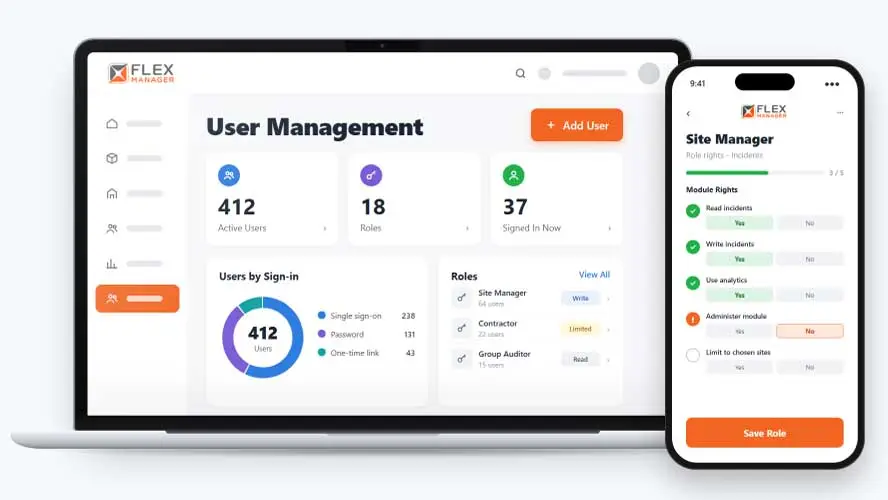
Can you be sure a contractor or visitor logging into your system only sees what they’re meant to? When staff and external users share the same access, sensitive information may be exposed to people who should never see it. Passwords can also go unchanged for months or years, so login security often depends on someone remembering to update them.
Shared logins
Several people use one account, so nobody can say who opened or changed a record.
All or nothing
Everyone gets the same rights, so a contractor can open another site's incident reports.
Access on a spreadsheet
Who has what lives in a spreadsheet that nobody updates when people change jobs or leave.
Key features & benefits
Cloning Options, Not Rebuilt From Scratch
Clone an existing group to set up a new team fast, so onboarding a new group of users doesn't mean configuring access from zero every time.
Present and Past Visibility
See who is signed in now and on any past day, providing key context where you and your team need it.
Security Features
Lock accounts after the number of failed sign-ins you choose.
From role to sign-in
Set a role up once and every person in it gets the same access.
Build roles
Set read, write, analytics, and admin rights per role and module.
Narrow it
Limit a role to chosen sites or whole site categories; narrow a role to chosen equipment, work order, or incident categories.
Add people
First-time single sign-on users get a profile automatically; one-time sign-in links sent by email, or text, where licensed.
Review
Export every user, role, and role's rights to Excel.
See User Management in action.
Bring a real case to the demo. We will build it live.
Built for admins who need to prove who has access
From IT to the site office, everyone works from the same set of roles.
IT Manager
Sets password length, character count, history, and expiry rules.
HSEQ Manager
Owns the safety modules and switches which roles can open incidents and audits on the permission screen.
Operations Director
Keeps each site team, and each subcontractor company, within the sites they work on.
Compliance Lead
Hands an auditor one export of every user, their role and what that role can do.
Onboarding built around your needs. We're ready when you are.
We work to your pace and your team's availability. Your dedicated onboarding specialist takes care of the setup, so getting started stays simple.
Configuration
We configure FlexManager around your procedures.
Training
Short, role-based sessions for admins and field teams. Most users are confident after their first use.
Go Live!
Start with one site or roll out everywhere at once. Your account manager stays with you after launch.
Get started with User Management










Frequently Asked Questions
Can I set different access levels for external users like subcontractors or clients?
Yes. User Management lets you separate access levels for staff and external users, so someone from outside your organization can be given exactly the access they need, whether that’s a single project or a limited set of categories, without opening up anything else.
What sign-in options are available besides a password?
Alongside your existing company login, FlexManager supports one-time email or text links for quick access and tap-to-sign-in with an NFC card. Which option makes sense depends on the situation, for example, an NFC card for someone signing in repeatedly on-site versus a one-time link for occasional access.
Does User Management guarantee our data is secure?
No single system can guarantee complete security on its own. User Management gives you the tools to help control exactly what each person can see and do, enforce password rules and expiry, and export a full record of users and their access, so your organization can manage and demonstrate its own access controls as part of a wider security approach.
Why choose FlexManager for user management?
FlexManager has been building workforce management software since 2011, and information security is built into how we operate. FlexManager is certified to ISO 27001 certification alongside ISO 9001, ISO 14001, and ISO 45001, and it’s that industry-backed accreditation that means we have the know-how we need.