
Your reports, filtered, and delivered automatically.
Manually compiling and sending the same reports to different stakeholders eats into time better spent elsewhere. FlexManager's Scheduled Reporting module filters high-volume data down to what's relevant, combines it into tailored reports, and delivers them automatically to the right inboxes on the schedule you set.
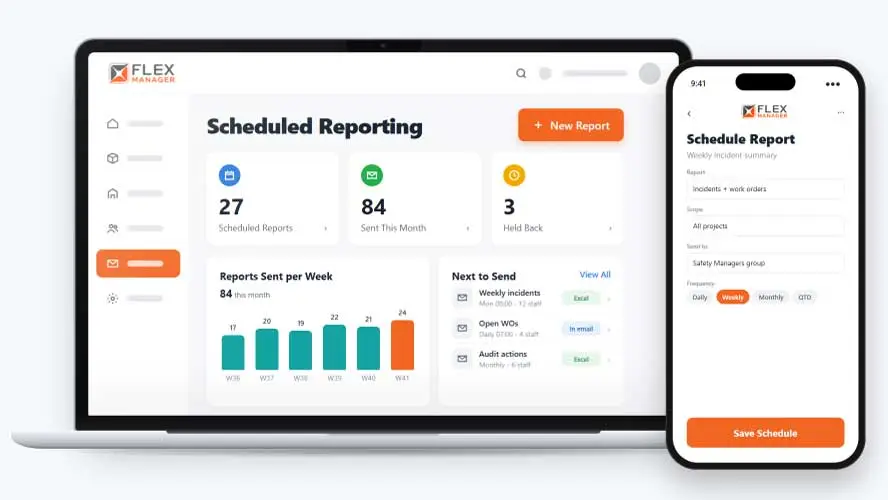
Pulling data from several systems into one report can be slow and manual when you don’t have the right workaround. Sending it on time to the right people often relies on someone remembering. Once it’s sent, there’s usually no clear record of what went out, to whom, or when. That can cause problems very quickly.
Copy and paste reporting
Someone exports from each system and stitches the spreadsheet together every week.
Numbers without context
A forwarded file does not say which period, sites or filters it was built from.
Actions out of sight
Open corrective actions sit in a different list from the audit or incident that raised them.
Key features & benefits
Filter the Excess
Discover what's actually driving your numbers with advanced filters that trim down data noise, so a report highlights the primary drivers instead of everything at once.
Digital Records
Maintain a secure, paperless audit trail of every report sent, accessible instantly whenever it's needed, rather than searching back through old emails.
Configure Reports
Tailor the layout, frequency and recipients of a report to suit whoever's actually going to read it, rather than sending the same format to everyone.
Automated Email Delivery
Deliver a dataset directly to the inboxes of the people who need it, on a schedule you set rather than a task someone has to remember.
Regular Stakeholder Updates
Keep stakeholders updated on performance on a predictable schedule, without someone having to compile and send a report manually each time.
From modules to inbox
One report definition does the work every period, from picking the data to the file that lands in the inbox.
Build
Pick the columns you need, including from related records; combine incidents, audits, work orders, and more in one report.
Filter and scope
Filter status, type, and category by name, not by code; scope by project category—new projects are included automatically.
Schedule
Schedule daily to yearly, or month, quarter, and year-to-date; choose the day and hour each report goes out.
Deliver
Send to staff, user groups, or subcontractor employees; recipients open reports on screen to sort, filter, and export.
See Scheduled Reporting in action.
Bring a real case to the demo. We will build it live.
Built for the teams who report to stakeholders
From the board pack to the site manager's weekly list, everyone works from reports built on the same records.
Head of HSEQ
Gets incidents, audits, and a count of their open linked work orders in one report.
Operations Director
Can download past scheduled runs from My Reports, giving them an important overview of what's been sent.
Project Manager
Can summarise by group and compare with the previous period.
System Administrator
Starts from standard reports and is able to copy them to customise.

SSC
FlexManager improved Sports Surgery Clinic's data transparency across departments, creating a visibility of deadlines and persons responsible for assets. They used FlexManager's Scheduled Reporting module, meaning they had automated reports available at the click of a button.
Onboarding built around your needs. We're ready when you are.
We work to your pace and your team's availability. Your dedicated onboarding specialist takes care of the setup, so getting started stays simple.
Configuration
We configure FlexManager around your procedures.
Training
Short, role-based sessions for admins and field teams. Most users are confident after their first use.
Go Live!
Start with one site or roll out everywhere at once. Your account manager stays with you after launch.
Get started with Scheduled Reporting










Frequently Asked Questions
What is FlexManager's Scheduled Reporting module?
Scheduled Reporting is FlexManager’s module for automating stakeholder reporting. It filters high-volume data down to what’s relevant, combines it into consolidated reports across departments, locations or data types, and delivers them automatically by email on a schedule you set, keeping a secure digital record of everything sent.
How does Scheduled Reporting filter out unnecessary data?
Scheduled Reporting uses advanced filters to trim down data noise and surface the primary drivers behind your numbers. Instead of a report containing every data point available, it highlights what’s actually relevant to the stakeholder receiving it, cutting clutter without losing the detail that matters.
Can I combine data from multiple departments or sites into one report?
Yes. Scheduled Reporting can combine data into consolidated overviews across departments, locations or data types, rather than sending separate reports for every individual metric. This gives stakeholders one combined view instead of several disconnected reports to piece together themselves.
How are reports delivered to stakeholders?
Reports are delivered by automated email, sent directly to the inboxes of the people who need them, on a schedule you configure rather than a task someone has to remember. This removes the manual step of compiling and sending reports individually to each stakeholder.
Can I customize who receives a report and how often?
Yes. You can configure the layout, frequency and recipients of a report, so it’s tailored to whoever is actually going to read it. This means different stakeholders can each receive a version of a report suited to what’s relevant to them, rather than one generic format for everyone.
Does Scheduled Reporting keep a record of past reports?
Yes. Scheduled Reporting maintains a secure, paperless audit trail of every report sent, accessible instantly whenever it’s needed. Rather than searching back through old emails to find what was shared and when, that record is kept as part of the module itself.
Why choose FlexManager for scheduled reporting?
FlexManager has automated reporting and analytics for HSEQ and operations teams since 2011, built by people who understand what stakeholders actually need to see, not just what’s easiest to export. FlexManager is certified to ISO 9001, ISO 14001, ISO 27001 and ISO 45001 certification, and it’s the ISO 27001 information-security standard that underpins the secure, paperless audit trail Scheduled Reporting keeps of every report sent, so there’s a reliable record of what went out, to whom, and when.