
Turn meeting actions into tasks you can track.
A meeting that ends without assigned actions rarely produces results. FlexManager's Meetings module runs from a structured, shared agenda through to a full record of decisions, linking every follow-up task straight to the person responsible via Task Manager, so nothing discussed gets left to memory.
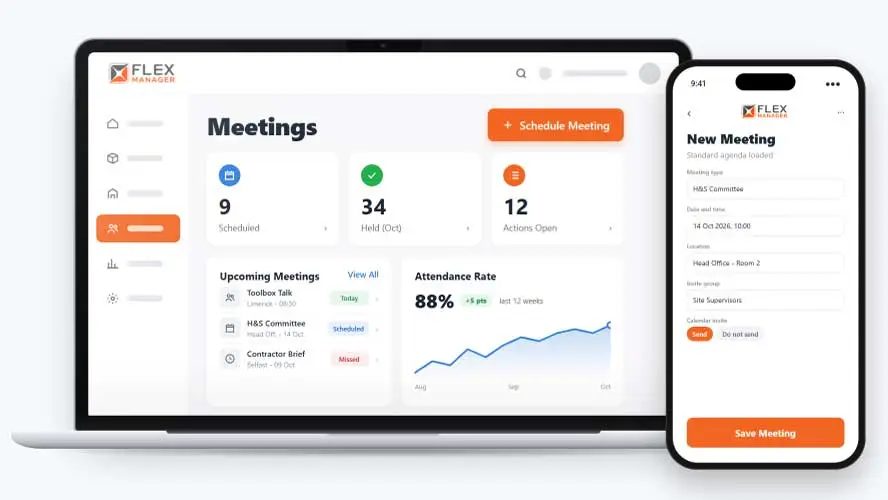
Most meetings end with a list of actions. However, when follow-ups only exist as lines in the minutes, they’re easy to lose and hard to chase. Before you know it, nobody owns them, nobody tracks them, and the minutes aren’t opened again until the next meeting. By then, the same issues are back on the agenda.
Minutes written up later
Someone types the notes from memory afterwards, and the detail that mattered is already gone.
Actions lost in email
Actions go out in a document nobody opens again, so nobody owns them.
Attendance by memory
Nobody can say who was actually in the room, only who was invited.
Key features & benefits
Task Linking Through Task Manager
Turn discussion points into follow-up actions by linking tasks to the people responsible using FlexManager's Task Manager, so an action doesn't just live in someone's notes.
Full Record of Decisions
Maintain a full record of the decisions made in a meeting, setting clear expectations for what's to be done, by when, and who's doing the follow-up.
Centralized Meeting Documents
Attach presentations, reports, or other resources to a meeting, and store meeting documents centrally, so participants have context and files without hunting through separate folders.
Efficient Action Item Tracking
Track action items from meetings efficiently, helping ensure tasks are assigned, completed, and followed up on in a timely manner rather than quietly falling through the cracks.
Cross-Team Communication & Collaboration
Enhance communication and collaboration within teams and across departments, so meetings become a place decisions genuinely get made and shared, not just discussed.
From invite to action
One meeting record carries the whole cycle, from the calendar invite to the tasks raised in review.
Plan
Send every attendee a calendar invite from the meeting; every meeting type starts with its own standard agenda
Manage
Time each agenda item and minute it as you go; tick who actually attended, separate from who was invited.
Review
Turn any action minute into a work order task; see each action's task status and due date on the meeting.
Track
One meeting PDF with agenda, minutes, tasks, documents, and attendees.
See Meetings in action.
Bring a real case to the demo. We will build it live.
Built for anyone who runs meetings that need follow-through
From the safety committee to the site cabin, everyone works from the same record of what was agreed and who owns it.
HSEQ Manager
Can run safety committees and toolbox talks from a standard agenda, and reports attendance across them.
Operations Manager
Sees each action as a work order task, with its status and due date.
Project Manager
Books meetings from work orders; unstarted meetings are marked Missed and can be rescheduled.
Meeting Coordinator
Sends the invites; meetings handed to them while on leave go to their delegate.
Irish Dog Foods
FlexManager was brought in to streamline the manual processes with a centralised digital system for managing quality, health and safety, and providing operational oversight. As part of this, Irish Dog Foods implemented the Meetings module to help ensure consistent processes and easier access to critical documentation.
Read the case study →Onboarding built around your needs. We're ready when you are.
We work to your pace and your team's availability. Your dedicated onboarding specialist takes care of the setup, so getting started stays simple.
Configuration
We configure FlexManager around your procedures.
Training
Short, role-based sessions for admins and field teams. Most users are confident after their first use.
Go Live!
Start with one site or roll out everywhere at once. Your account manager stays with you after launch.
Get started with Meetings










Frequently Asked Questions
What does FlexManager's Meetings module do?
It runs a meeting from a structured, shared agenda through to a full record of the decisions made, linking every follow-up action straight to the person responsible via Task Manager. Presentations, reports and other files can be attached too, so a meeting produces tracked action rather than just a set of notes.
Can meeting actions be assigned to specific people?
Yes. Discussion points can be turned into follow-up actions and linked to the people responsible using FlexManager’s Task Manager, so an action is tracked as a real task rather than just a line item in the minutes.
Is there a record kept of what was decided in a meeting?
Yes. A full record of the decisions made is maintained, setting clear expectations for what’s to be done, by when, and who is responsible for the follow-up, rather than relying on someone’s memory of what was agreed.
Can files be attached to a meeting for participants to reference?
Yes. Presentations, reports or other resources can be attached to a meeting, and documents are stored centrally, so participants have the context they need without hunting through separate folders or email threads.
Does the module help make sure action items actually get followed up on?
Yes. Action items from meetings are tracked so that tasks are assigned, completed and followed up on in a timely manner, rather than being noted down and then quietly forgotten once the meeting ends.
Can Meetings be used to coordinate across different sites or departments?
Yes. The module is built to enhance communication and collaboration within teams and across departments, and connects with Location Management, so meetings can support coordination across more than one site.
Why choose FlexManager for meeting management?
FlexManager has been building practical compliance software since 2011, with hands-on HSEQ expertise behind every module we build. FlexManager is certified to ISO 9001, ISO 14001, ISO 27001 and ISO 45001 certification. For meeting management specifically, that hands-on background is why the module ties every discussion point to an accountable follow-up action, not just a set of notes nobody looks at again.