
Each stock issue leaves a numbered docket.
A stock issue that leaves no paper trail is hard to account for later. FlexManager's Stock Delivery Dockets module produces a delivery docket for each stock issue, capturing who dispatched what, when, and to which project, as a printable record ready to hand over or file.
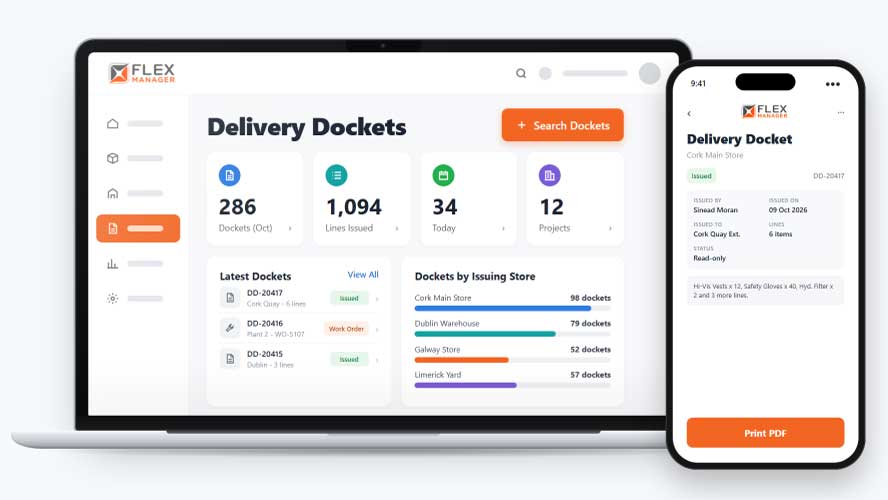
Once stock leaves the warehouse, it’s hard to prove exactly what went out. A dispatch log might show that a delivery happened, but not which items were on it. When a site disputes a delivery, an item goes missing, or an auditor asks months later, you’re left digging through emails, paper copies, and memory.
Carbon docket books
Dockets are written by hand when there is time, and the copy goes missing.
Nothing written down
Stock leaves the store with no note against it, so nobody can say later what went out.
Paperwork hunts
Finding last month's docket means searching the van, the site office and the filing tray.
Key features & benefits
A Docket for Every Stock Issue
Generate a delivery docket for every stock issue, so there's always a record of what left the yard and where it was actually sent.
Created Automatically, Not Manually
Dockets are created automatically as stock is issued, so producing a record doesn't mean a separate step someone has to remember to do.
A Numbered, Printable Record
Print a professional delivery docket as a PDF, with each docket carrying its own unique number, so it can be handed over, filed or referenced later without any confusion over which docket is which.
From the shelf to the docket
The docket comes from the stock issue itself, so the paperwork and the stock record are built from the same lines.
Issue
Issue stock to a person, work order, asset, maintenance job, or another store.
Docket
A numbered docket is created with every line issued, the issuer, the date, and the destination.
Generate the PDF with the destination, the project's address, the issuer's contact details, and a quantity total.
Find
Search dockets across projects and export the results to Excel or PDF.
See Stock Delivery Dockets in action.
Bring a real case to the demo. We will build it live.
From project record to spreadsheet
Stores, site and office teams work from the same docket, created when the stock leaves the shelf.
Stores Manager
Gets a numbered docket for every issue without filling in a second form.
Site Manager
Sees the project's dockets, what each one held, who issued it, and where it went.
Operations Manager
Finds a docket by number, date, or issuer when a delivery is questioned, and prints it again.
Finance Lead
Exports docket searches to Excel with the project, project code, and category on each row.
Onboarding built around your needs. We're ready when you are.
We work to your pace and your team's availability. Your dedicated onboarding specialist takes care of the setup, so getting started stays simple.
Configuration
We configure FlexManager around your procedures.
Training
Short, role-based sessions for admins and field teams. Most users are confident after their first use.
Go Live!
Start with one site or roll out everywhere at once. Your account manager stays with you after launch.
Get started with Stock Delivery Dockets










Frequently Asked Questions
Do dockets need to be created manually?
No. Dockets are created automatically as stock is issued, so a printable record exists the moment stock goes out rather than depending on someone remembering to raise one afterwards.
Can a docket be found again later if needed?
Yes. Dockets can be searched across all your projects, and viewed directly from the project or employee profile they relate to, so finding a specific docket doesn’t mean digging through a long, undifferentiated list.
What does a printed docket actually show?
A printed docket shows exactly which items went out, along with its own unique number, so whoever receives it can confirm what was delivered against a clear, referenceable record rather than taking someone’s word for it.
Why choose FlexManager for stock delivery dockets?
FlexManager has been building workforce and plant management software since 2011, with a team that includes people who’ve actually worked in operations, not just engineers. FlexManager is certified to ISO 9001, ISO 14001, ISO 27001 and ISO 45001 certification, and it’s that industry-backed accreditation that means we have the know-how we need.