
Know your stock levels, schedule counts your way.
A stock count that just confirms a number on a page doesn't tell you much. FlexManager's Stock Take module guides a physical count of stock in a store, compares it against recorded levels, and updates the system with the counted figures the moment the count is done.
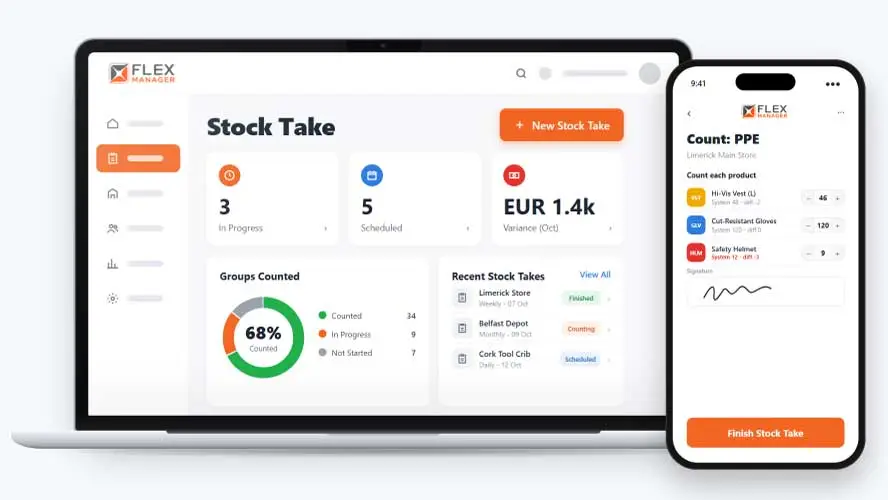
Stock takes tend to happen only when someone remembers to organise one, so counts are irregular and discrepancies build up unnoticed between them. As a result, there’s often no clean record of what was counted, only scribbled sheets or a spreadsheet that’s hard to share or rely on later.
Clipboard counts
Three people count the same shelf and come back with three different totals.
Re-keyed by hand
Every figure is typed into the spreadsheet afterwards, and a mistyped line goes unnoticed.
A gap with no price
The difference between the count and the books is a number, not a cost anyone can see.
Key features & benefits
Attach Context
Attach photos and documents to a stock take, providing relevant context where it is needed.
Get Notified
The store's person responsible is told when a count finishes.
Alerts
Get important alerts around stock levels; counts below the restock level feed the daily low-stock alert.
From count to live level
One take walks the store group by group, then writes the counted figures back to the stock levels.
Create
Pick the store and stock groups, or let a schedule create the take ahead of time.
Count
Count group by group, with a box for every product.
Check
Open the take; each line shows the difference and what it costs.
Finish
The finish step lists any group still to be counted; add an optional on-screen signature when finishing.
See Stock Take in action.
Bring a real case to the demo. We will build it live.
From signed-off count to full history
Stores, site, and finance teams work from the same count, from the shelf to the cost of the gap.
Stores Manager
Counts the store group by group, sees each line's difference and cost, and finishes with the levels set to the count.
Store Supervisor
Can see who entered each group's counts, with comments.
Finance Controller
Sees the cost of every difference, totalled on the take, and can search and export takes across projects.
Operations Director
Has a printable record of each count, signed on screen if you choose.
Onboarding built around your needs. We're ready when you are.
We work to your pace and your team's availability. Your dedicated onboarding specialist takes care of the setup, so getting started stays simple.
Configuration
We configure FlexManager around your procedures.
Training
Short, role-based sessions for admins and field teams. Most users are confident after their first use.
Go Live!
Start with one site or roll out everywhere at once. Your account manager stays with you after launch.
Get started with Stock Take










Frequently Asked Questions
What happens to stock levels once a count is finished?
Live stock levels update from your count in one step, so the system reflects what was actually counted straight away rather than needing a separate correction to bring the records back in line.
How do you know if a discrepancy actually matters?
Every discrepancy shows its cost impact alongside the variance between counted and recorded levels, so you can judge a shortfall by what it’s actually worth, not just by how big the number looks on its own.
Can stock takes happen automatically on a schedule?
Yes. Stock takes can be scheduled to recur automatically, so counts happen on a regular rhythm rather than depending on someone remembering to organise the next one.
Why choose FlexManager for stock take?
FlexManager has been building workforce and plant management software since 2011, with a team that includes people who’ve actually worked in operations, not just engineers. FlexManager is certified to ISO 9001, ISO 14001, ISO 27001 and ISO 45001 certification, and it’s that industry-backed accreditation that means we have the know-how we need.