
Daily checklists that mean you can stay across who cleaned what.
A cleaning rota that lives on a whiteboard is easy to miss or lose track of, and it means it's even easier to forget the relevant information once the task is done. FlexManager's Daily Checklists module builds recurring cleaning rotas automatically, gives operatives a clear task list, and captures sign-off with a signature, relevant photos, and a precise location.
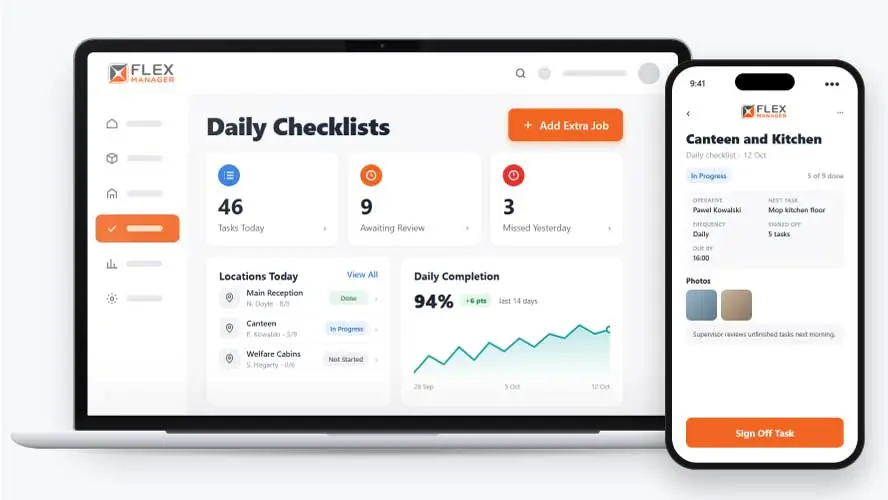
When cleaning rotas live on paper or in spreadsheets, operatives don’t get clear instructions, equipment gets missed and there’s no proof of what was actually cleaned or where.
Sheets on the door
Initials and times that could have been written in advance, with no way to tell who did the job.
Gaps found too late
A missed clean comes to light at the audit or the complaint, not the next morning.
Rotas by hand
Every new room, absence or extra clean means editing the spreadsheet and phoning round for cover.
Key features & benefits
Recurring Task Scheduling
Set cleaning tasks to repeat daily, weekly, or monthly, so that a rota doesn't need to be rebuilt every time a new period starts.
Signature Sign-Off
Capture sign-off with a signature on completion, giving a clear, individual record of who completed a cleaning task and when.
PDF Day Reports
Produce a PDF report for each cleaning day, giving a single, reviewable document rather than scattered notes and photos.
From rota to filed record
Set the rota once. Each day is built, signed off, reviewed, and filed without anyone rewriting a sheet.
Schedule tasks
Repeat tasks daily, weekly, on odd or even weeks, or monthly
Assign
Each task goes to the default operative set for its location.
Sign off
Operatives sign off in the mobile app with photos and a signature; see on a map where each task was signed off.
Review and file
Each day closes with a supervisor review, while each day's completion percentage can be shown on-screen and in a PDF.
See Daily Checklists in action.
Bring a real case to the demo. We will build it live.
Built for the teams who keep sites clean
From the person with the mop to the person signing the contract, everyone works from the same dated record.
Cleaning Supervisor
Sees progress by location and by operative through the day, and closes or moves anything left open the next morning.
Facilities Manager
Sets each type of location's tasks once, with extra checklists on request from the app and cover for absence.
Infection Control Lead
Has a filed PDF for each day showing who signed off each area, at what time, with signatures and photos.
Operations Director
Sees each day's completion percentage and report in one list, and can be told when each day is closed.
Onboarding built around your needs. We're ready when you are.
We work to your pace and your team's availability. Your dedicated onboarding specialist takes care of the setup, so getting started stays simple.
Configuration
We configure FlexManager around your procedures.
Training
Short, role-based sessions for admins and field teams. Most users are confident after their first use.
Go Live!
Start with one site or roll out everywhere at once. Your account manager stays with you after launch.
Get started with Daily Checklists










Frequently Asked Questions
What is FlexManager's Daily Checklists module?
Daily Checklists is FlexManager’s module for building recurring cleaning rotas for a project’s locations. It automatically builds forward-looking calendars, gives operatives a clear daily task list, and captures completion sign-off with a signature, photos, and comments for every cleaning task.
How often can cleaning tasks repeat?
Cleaning tasks can be set to repeat daily, weekly, or monthly, and forward-looking cleaning calendars can be built automatically to help reduce administrative load. This means a rota doesn’t need to be manually rebuilt each time a new day, week, or month starts.
What proof of completion does the module capture?
Completion is captured with a signature, along with photos attached as proof of the clean, as well as information on the location where it happened. A PDF report can then be produced for each cleaning day, pulling relevant information together into a single document.
Why Choose FlexManager for daily checklists?
FlexManager has supported facilities and operations teams running cleaning programmes since 2011, shaped by people who understand the difference between a clean that’s actually been checked and one that’s just been ticked off. FlexManager is certified to ISO 9001, ISO 14001, ISO 27001 and ISO 45001 certification, and it’s that industry-backed accreditation that gives us the know-how we need.