
Know your approved subcontractors, and where they work.
Letting an unapproved subcontractor onto a project is a risk that's entirely avoidable. FlexManager's Subcontractor Manager module registers subcontractor companies and tracks their approval status, project assignments, and compliance from first application through deactivation, so only approved companies are ever actually working.
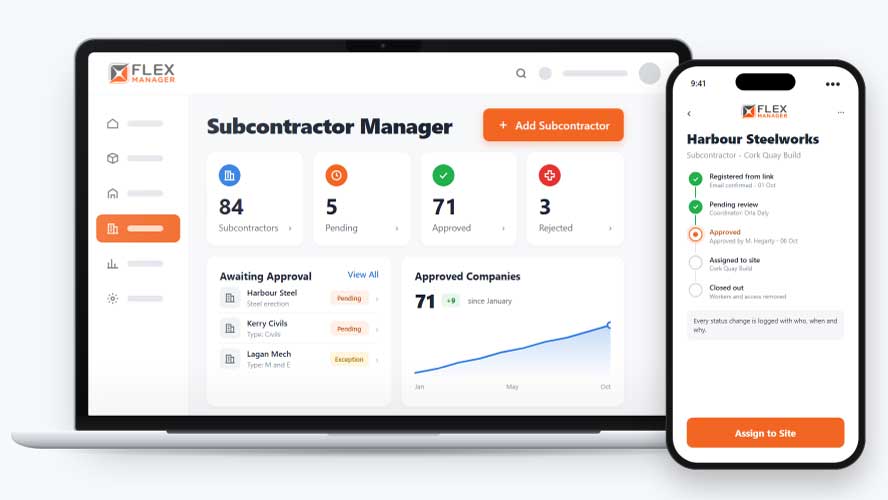
Even once subcontractors are working, it’s hard to keep track of who’s assigned to which site, and their project history ends up spread across spreadsheets and people’s memories. When someone asks where a subcontractor has worked before, could you answer quickly and with confidence?
Spreadsheet approved lists
One copy says approved, another says lapsed, and nobody is sure which one is current.
Registration packs by email
New contractors send forms that someone retypes before anyone can approve them.
Loose ends at the gate
When a contract ends, workers, site lists and passes are tidied up one by one, if at all.
Key features & benefits
One Approved List
Keep one approved list of subcontractor companies, so there's a single, reliable answer to who's actually allowed to work, rather than several different lists floating around.
Stop Unapproved Companies Automatically
Stop unapproved or lapsed companies from working, so a company that hasn't been approved, or whose approval has lapsed, is blocked automatically rather than relying on someone remembering to check.
Downgrade Capabilities
With control details, expired insurance can downgrade a company.
From sign-up to sign-off
One company record carries a subcontractor from the registration link to the day the contract ends.
Register
Subcontractors register themselves from a link for their type; registration can collect the compliance details each type needs.
Approve
Approve, approve with exception, or reject each company; status history shows who changed it, when, and the reason.
Assign to sites
Add companies to sites; see which companies are on each site and who approved them.
Close out
Deactivate once: workers, site links, and, with Access Control, door access.
See Subcontractor Manager in action.
Bring a real case to the demo. We will build it live.
From questionnaire to audit trail
From procurement to the site gate, everyone works from the same company record and the same status.
Procurement Manager
Keeps one register of every company with its status and history; can import existing lists and merge duplicates.
HSEQ Manager
With control details, expired insurance can downgrade a company; option to offer only approved companies in company pickers.
Project Manager
Sees which companies are on the site, who approved them, and when.
Operations Director
Ends a contract in one step, on screen or through the API, with workers and site links closed off together.

BAM
With Subcontractor Manager, BAM were able to help ensure that each contractor had received the correct induction and that their training records remained up-to-date and met the compliance requirements.
Onboarding built around your needs. We're ready when you are.
We work to your pace and your team's availability. Your dedicated onboarding specialist takes care of the setup, so getting started stays simple.
Configuration
We configure FlexManager around your procedures.
Training
Short, role-based sessions for admins and field teams. Most users are confident after their first use.
Go Live!
Start with one site or roll out everywhere at once. Your account manager stays with you after launch.
Get started with Subcontractor Manager










Frequently Asked Questions
Does approval in the system mean a subcontractor is fully compliant?
Approval reflects the status your team has recorded, based on the pre-qualification, compliance requirements and any exceptions you’ve reviewed for that subcontractor type. It’s your organisation’s own record of that decision, not an independent guarantee of a subcontractor’s actual compliance.
What happens if a subcontractor company is deactivated?
Deactivating a company cascades automatically to its workers, so removing a subcontractor doesn’t leave individual workers still appearing active elsewhere in the system after the company itself has been stopped.
Can we track every project a subcontractor has worked on?
Yes. A full history of project assignments is kept for every subcontractor, alongside which sites they’re currently assigned to, so you can see exactly where a company has worked, not just where it’s working now.
Why choose FlexManager for subcontractor management?
FlexManager has been building workforce and compliance software since 2011, with hands-on HSEQ experience behind the team, not just software developers. FlexManager is certified to ISO 9001, ISO 14001, ISO 27001 and ISO 45001 certification, and it’s that industry-backed accreditation that means we have the know-how we need.