
So your permits reflect who’s authorised.
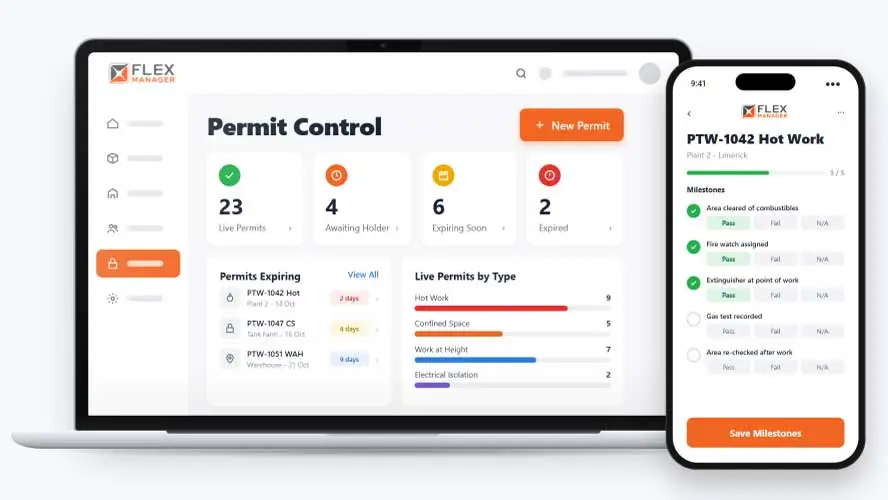
High-risk work started without the right sign-off is how a routine job turns into a serious incident. FlexManager's Permit Control solution brings a clear, structured approval process to permit issuance, integrates hazard analysis before work begins, and captures electronic signatures on-site so accountability doesn't depend on a paper trail.
Does every permit you issue match who is actually qualified to do the work? When permits sit apart from training and authorisation records, mistakes slip through unnoticed.
Lost in the binder
Nobody outside the site office can see which permits are live at a location today.
Expiry by memory
Permits lapse while the work carries on, because the expiry date lived on paper.
Checks taken on trust
Work starts before anyone has confirmed the isolations and fire watch are in place.
Key features & benefits
Electronic Signature Capture
Capture attendee signatures directly on-site, eliminating paper records while keeping clear accountability for who was actually present for the work.
Mobile-to-Desktop Permit Management
Request and approve permits in the field or office, with a live desktop view of permit status, access and post-work analysis.
Structured, Competency-Gated Approval
Define a clear, structured review process for permit validation, helping ensure only competent personnel can issue or approve a permit for high-risk work.
Integrated Risk & Hazard Assessment
Integrate risk assessments and hazard analysis directly into the permit process, so a potential hazard is identified before the work is authorised to begin.
Reporting & Compliance Analytics
Analyse permit volumes, categories, and statuses, giving visibility into how well compliance standards are being met across high-risk work, not just permit by permit.
From raised to expired
One record carries the permit from the day it is raised to the day it lapses, with the people who need it kept in the loop.
Raise
You can start by raising a permit to work by type and location.
Confirm
The person responsible confirms the necessary actions are done, and the permit becomes Current.
Track
Track Waste Log or Production Tracking amounts against permit limits.
Expire
Find permits by number, type, expiry, location, or location tag; expiry reminders can be sent to the people you choose, with your lead time.
See Permit Control in action.
Bring a real case to the demo. We will build it live.
Built for anyone who authorises high-risk work
From the permit holder to the safety lead, everyone works from the same list of new, current, and expired permits.
HSEQ Manager
Finds permits by number, type, expiry, or location; can export permit search results to Excel or PDF.
Site Manager
Sees the permits that apply at a location and links them to the job's risk assessment.
Permit Holder
Confirms the necessary actions are done, raises follow-up work orders from the new permit, and works through its milestones.
Environmental Manager
Can alert chosen people and groups when permits change or expire.

Roadstone
FlexManager provided the solution of an easily implemented and effectively managed centralised solution. As part of this, Roadstone enrolled in the Permit Control module.
Onboarding built around your needs. We're ready when you are.
We work to your pace and your team's availability. Your dedicated onboarding specialist takes care of the setup, so getting started stays simple.
Configuration
We configure FlexManager around your procedures.
Training
Short, role-based sessions for admins and field teams. Most users are confident after their first use.
Go Live!
Start with one site or roll out everywhere at once. Your account manager stays with you after launch.
Get started with Permit Control










Frequently Asked Questions
What does FlexManager's Permit Control module do?
It brings a clear, structured approval process to permits for high-risk work, integrating risk assessments and hazard analysis so a potential hazard is identified before work is authorised. Attendee signatures are captured electronically on-site, and permit status is visible live on desktop, whether the permit was raised in the field or the office.
Can external contractors request and manage their own permits?
Yes. External teams are given secure access to request and manage permits directly, rather than depending on someone internal to raise a permit on their behalf every time work needs to be authorise
Who is allowed to issue or approve a permit?
Only competent personnel can issue or approve a permit for high-risk work, following a clear, structured review process, rather than authorisation being left to whoever happens to be available at the time.
Is hazard analysis part of the permit process itself?
Yes. Risk assessments and hazard analysis are integrated directly into the permit process, so a potential hazard is identified as part of authorising the work, rather than handled as a separate step beforehand.
Can permits be requested and approved away from a desk?
Yes. Permits can be requested and approved in the field or in the office, with a live desktop view of permit status, access and post-work analysis available either way, so nobody is stuck waiting on a paper form.
How are permits signed off on-site?
Attendee signatures are captured electronically directly on-site, eliminating paper records while keeping clear accountability for exactly who was present for a given piece of high-risk work, from start to finish.
Why choose FlexManager for permit to work management?
FlexManager has been building practical compliance software since 2011, with hands-on HSEQ expertise behind every module we build. FlexManager is certified to ISO 9001, ISO 14001, ISO 27001 and ISO 45001 certification. For permit control specifically, that ISO 45001 health and safety grounding is why the module ties permit approval to competency and training, not just a signature on a form.