
Know what each site produced, entry by entry.
A production figure that isn't logged the way your operation actually measures it isn't much use later. FlexManager's Production Tracking module means you can record measured production output against a project and date, by category, in your own units of measure, with room for the supporting detail behind each number.
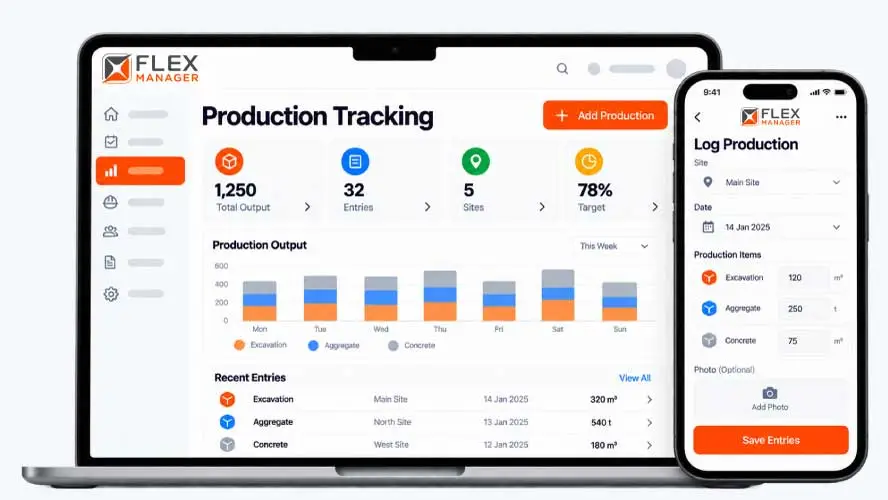
Logging production one entry at a time is slow, so updates get batched up, delayed, or skipped. Once the figures are in, they sit in tables that make it hard to see how output changes from day to day. Context such as photos or notes about what affected a shift is kept somewhere else, and the reports end up as a wall of numbers that few people read.
Shift sheets
Figures sit on paper at the line until someone types them up.
Mixed units
Each site reports in its own units, so the totals do not add up.
Permit caps unchecked
Nobody adds output up against the permit until the limit has gone.
Key features & benefits
Log Output Against Any Project
Log production output against any project, so every figure is tied to the work it actually came from rather than sitting in a spreadsheet on its own.
Your Own Units, Your Own Categories
Record quantities in your own units of measure, and set up your own production categories, so the module fits how your operation already measures output instead of the other way round.
See Totals and Trends Over Time
View production totals, and chart output by site over time, filtered by production type.
From entry to total
Each entry is logged once, then shows up on the site, the reports, the dashboards and, with Permit Control, the permit.
Log
Record production output against a site and date by production type and unit; Set up your own production types, units, and colours.
Detail
Attach photos and documents to each entry, creating key context that people will appreciate.
Track
Personal dashboards total output by type, with drill-down by site; charts of output by site over time, filtered by production type.
Alert
With Permit Control, alerts as a permit's output allowance runs low.
See Production Tracking in action.
Bring a real case to the demo. We will build it live.
Built for the office and the field
From the line to the board, everyone works from the same record of what each site produced.
Production Manager
Sees output totals by type and over any period; can log output per site and date in each type's own unit.
Site Manager
Can add a shift's entries in one go for the site.
Operations Director
Is able to search and find entries by type, date, quantity, or site, then export.
Permit Coordinator
With Permit Control, is alerted as a permit's output allowance nears or passes its limit.
Onboarding built around your needs. We're ready when you are.
We work to your pace and your team's availability. Your dedicated onboarding specialist takes care of the setup, so getting started stays simple.
Configuration
We configure FlexManager around your procedures.
Training
Short, role-based sessions for admins and field teams. Most users are confident after their first use.
Go Live!
Start with one site or roll out everywhere at once. Your account manager stays with you after launch.
Get started with Production Tracking










Frequently Asked Questions
Can production be recorded in our own units of measure?
Yes. Quantities can be recorded in your own units of measure, and production categories can be set up to match how your operation already classifies output, rather than forcing everything into a generic set of categories.
Can output be logged from the field rather than the office?
Production can be logged on a mobile device right in the field, so output gets recorded close to when and where it actually happened, rather than being reconstructed from memory back at a desk.
Can we see how output is trending over time?
Yes. Production totals and summaries per type are available alongside trend tracking over time, so you can see whether output on a project is climbing, holding steady or falling behind, not just what a single day produced.
Why choose FlexManager for production tracking?
FlexManager has been building workforce and plant management software since 2011, with a team that includes people who’ve actually worked in operations, not just engineers. FlexManager is certified to ISO 9001, ISO 14001, ISO 27001 and ISO 45001 certification, and it’s that industry-backed accreditation that means we have the know-how we need.