
Your documents can be tracked, logged, and approved for your peace of mind.
A document with no clear version history or sign-off trail is a compliance risk waiting to surface. FlexManager's Document Control module allows you to track every change automatically, logs access and edits in real time, and captures a digital signature on critical documents so you know when they're considered approved.
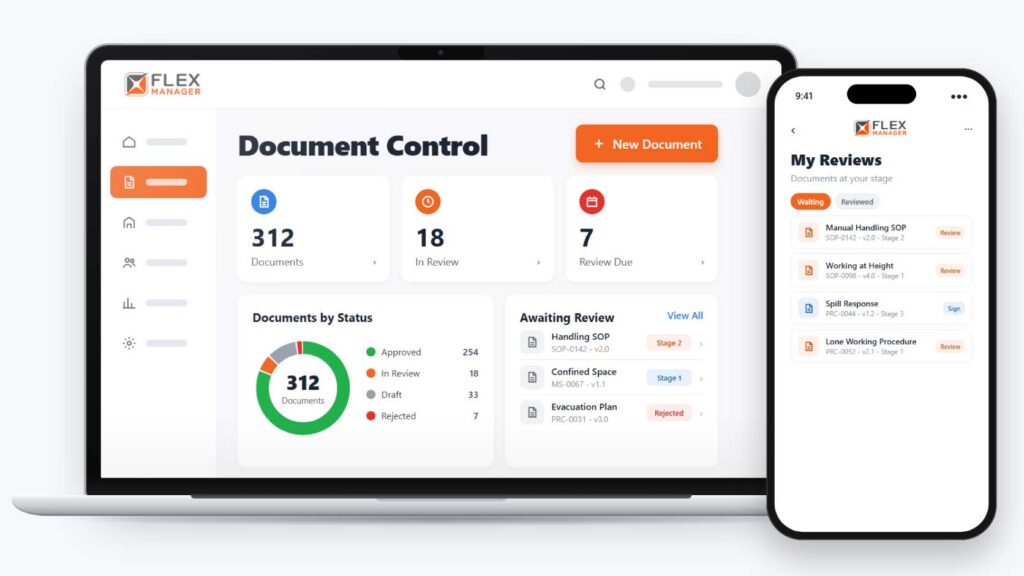
When nobody can be sure which version is current, who changed it or who signed it off, out-of-date documents stay in use and approvals can’t be trusted.
Approval by email
Drafts go round as attachments, and the sign-off sits in somebody's inbox.
Copies everywhere
The old version stays in the shared drive and the policy folder long after it was replaced.
Review dates on a spreadsheet
Someone has to remember to check, so a lapsed review only shows up at the audit.
Key features & benefits
Searchability
Every document can be searched by status, owner, tag, or review date, then exported.
Quality control
Make a reviewer signature required on review stages.
History
Earlier versions, reasons, and files stay on record — so every document has a virtual "paper trail". Plus, each stage's outcome, feedback, and signature stays in the review history.
Secure, Access-Controlled Documents
Control access to documents securely, protecting sensitive information so only authorised people can view or change them.
Efficient, Audit-Ready Distribution
Distribute documents efficiently to the people who need them, while maintaining the kind of documentation trail that makes an audit straightforward rather than stressful.
From draft to published
Each category sets the numbering, the review stages, and the review period for the documents filed under it.
Draft
Upload the primary file and any supporting files; the document is ready for review at this stage.
Review
Each reviewer is told when it is their turn; they see documents waiting at their stage in the portal.
Publish
The approved version is stamped with its approver, and approved versions replace the linked Document Library copy.
Re-review
Rejected documents return with comments as a new minor version; due documents come back for review where periodic review is set up.
See Document Control in action.
Bring a real case to the demo. We will build it live.
Built for teams who answer for what's in a document
Document owners, reviewers and the quality team work from one register of what is approved and when it is due.
Quality Manager
Sets each category's review stages and review period, can require reviewer signatures, and sees every document by status and stage.
Document Owner
Submits new versions, gets rejected drafts back with comments, is reminded before the review date.
Reviewer
Is told when a document reaches their stage, sees it waiting in the portal, and approves or rejects it.
HSEQ Manager
Sees each stage's outcome and signature in the review history, and the approved version in the linked policy and library.
Onboarding built around your needs. We're ready when you are.
We work to your pace and your team's availability. Your dedicated onboarding specialist takes care of the setup, so getting started stays simple.
Configuration
We configure FlexManager around your procedures.
Training
Short, role-based sessions for admins and field teams. Most users are confident after their first use.
Go Live!
Start with one site or roll out everywhere at once. Your account manager stays with you after launch.
Get started with Document Control










Frequently Asked Questions
What does FlexManager's Document Control module do?
It tracks every change to a controlled document automatically, logs access and edits in real time, and captures a digital signature before critical documents are considered signed off, giving your organisation total traceability over its documentation.
Can I see previous versions of a document?
Yes. Version control keeps previous versions available as reference material, so you can see exactly what changed between versions rather than only having access to the current one.
Who is allowed to make changes to a controlled document?
Document workflows can be tailored to your organisation, with permission to amend a document given only to people experienced enough for the task, rather than being open to anyone with access.
Do critical documents need a formal sign-off?
Yes. Digital signature capture means critical documents are formally signed off electronically, with every change traceable, so there’s no need to rely on a paper record for approval.
How is access to sensitive documents controlled?
Access is controlled securely, so only authorised personnel can view or change a document, protecting sensitive information from people who don’t need to see it.
How does the module help with distributing documents to the people who need them?
Documents can be distributed efficiently, so the right people have access to the current version when they need it, rather than chasing down the latest copy manually.
What other FlexManager modules connect with Document Control?
It connects with Policies & Procedures, Permit to Work and Document Library, so a controlled document’s version and access history stays linked to the wider processes it supports.
Why choose FlexManager for document control?
FlexManager has been building practical compliance software since 2011, with hands-on HSEQ expertise behind every module we build. FlexManager is certified to ISO 9001, ISO 14001, ISO 27001 and ISO 45001 certification. For document control specifically, that ISO 9001 foundation shapes the same version-control and approval discipline the module applies to every document your organisation manages.