
Show where your waste went, load by load.
Finding out you've exceeded a waste threshold after the fact is not a good revelation. FlexManager's Waste Log module tracks waste against thresholds you define, alerts you before a limit is reached, and forecasts future generation from historical data, so waste management stays proactive.
Waste logged on paper or in spreadsheets is cut off from wider site reporting. Levels creep past limits unnoticed, and with no trend data you only learn whether you’ve hit your waste goals once it’s too late to change course.
Paper transfer notes
Consignment notes sit in a cabin drawer or a van until someone needs one.
Totals by hand
Someone adds up the month in a spreadsheet, in whatever units each site used.
Permit limits unchecked
Nobody adds up waste against the permit until the limit has already gone.
Key features & benefits
Mobile-to-Desktop Integration
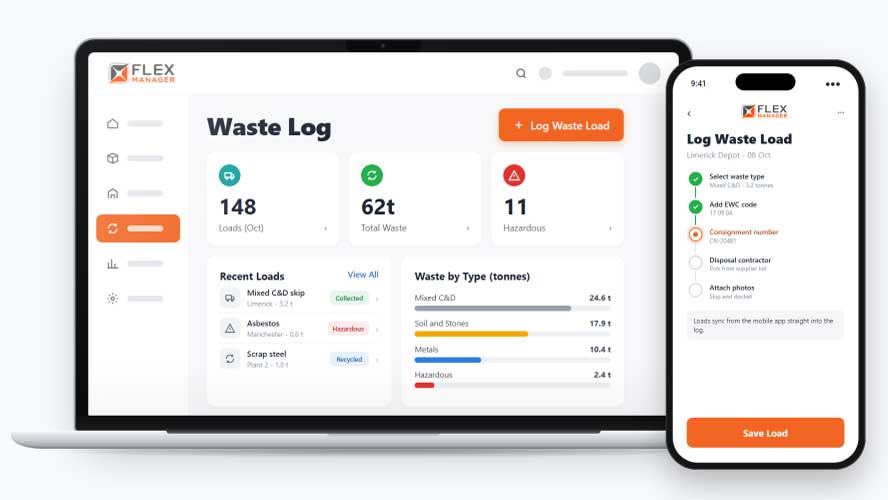
Log waste in the field and have it reported to desktop instantly, so records stay current without a separate step back at the office.
Threshold Alerts
Get notified before you approach a waste threshold, giving you time to act rather than finding out only after a limit's been crossed.
Custom Waste Thresholds
Define waste categories and thresholds that reflect your own operation, rather than working from a generic, one-size-fits-all limit that doesn't match your site.
Waste Reduction Insights
Monitor waste generation and disposal patterns over time, surfacing opportunities for reduction, recycling or more sustainable practices across your operation.
Detailed Waste Records
Keep accurate, detailed records of waste disposal over time, supporting the reporting that waste regulations typically require of your operation.
From load to total
Each load is logged once, then shows up on the site, the contractor, the reports and, with Permit Control, the permit.
Log
Log each waste load against a site and date by type and unit.
Detail
Record consignment numbers, EWC codes, and UN numbers on each load.
Track
Find loads by type, date, EWC code or UN number, then export; charts of waste by type, site, and contractor type over time.
Alert
With Permit Control, the people you choose are alerted as a permit's waste allowance runs out.
See Waste Log in action.
Bring a real case to the demo. We will build it live.
Built for the teams who track waste thresholds
From the site to the environmental team, everyone works from the same record of what left site and who took it.
Environmental Manager
Finds any load by EWC code, UN number or date and exports it when an audit asks.
Site Manager
Can add several loads in one go for the site.
HSEQ Director
Gets a load-by-load report with contractor, codes, and consignment numbers.
Permit Coordinator
With Permit Control, is alerted as a permit's waste allowance nears or passes its limit.

Roadstone
FlexManager provided the solution of an easily implemented and effectively managed centralised solution. Waste Tracking was one of the modules that Roadstone implemented.
Onboarding built around your needs. We're ready when you are.
We work to your pace and your team's availability. Your dedicated onboarding specialist takes care of the setup, so getting started stays simple.
Configuration
We configure FlexManager around your procedures.
Training
Short, role-based sessions for admins and field teams. Most users are confident after their first use.
Go Live!
Start with one site or roll out everywhere at once. Your account manager stays with you after launch.
Get started with Waste Log










Frequently Asked Questions
What is FlexManager's Waste Log module?
Waste Log is FlexManager’s module for tracking waste output against thresholds you define. It sends alerts before a limit is reached and forecasts future waste generation from historical data, so waste management stays proactive rather than reactive.
How do threshold alerts work?
You set the threshold for each waste category, and Waste Log notifies you as levels approach that limit. This gives you time to act before a threshold is actually reached, rather than discovering an exceedance only after it’s already happened.
Can I define my own waste categories and thresholds?
Yes. Waste categories and thresholds are defined by you, based on how your operation actually generates and manages waste, rather than a generic limit applied across every site. This keeps tracking relevant to your specific waste output and goals.
Does Waste Log help with forecasting future waste generation?
Yes. Waste Log uses historical data to forecast future waste generation, giving a realistic view of where your waste output is heading relative to your goals. This helps with planning rather than only reacting once a threshold has already been reached.
Does Waste Log help identify opportunities for waste reduction?
Yes. Waste Log monitors waste generation and disposal patterns over time, surfacing opportunities for reduction, recycling or more sustainable practices. Rather than only tracking against a threshold, this gives a longer-term view of how waste output is trending across your operation.
Can I log waste data from the field?
Yes. Waste can be logged from the field through mobile-to-desktop integration, with entries reported to desktop instantly. This keeps waste records current without requiring a separate step to re-enter field data once someone is back at a desk.
Why choose FlexManager for my waste log requirements?
FlexManager has supported environmental and HSEQ teams tracking waste since 2011, shaped by people who’ve actually managed waste permits and thresholds, not just built a logging tool from the outside. FlexManager is certified to ISO 9001, ISO 14001, ISO 27001 and ISO 45001 certification, and it’s the ISO 14001 environmental management standard in particular that shapes how Waste Log tracks thresholds and keeps detailed waste records, supporting the recordkeeping waste regulations typically require rather than guaranteeing compliance on its own.