
Know how far help is from every site.
Knowing where the nearest hospital or doctor is shouldn't mean a scramble the first time it's needed. FlexManager's Points of Interest module means you can map local services and amenities near each project, with distance, travel time, and directions from site, so that the information is ready before it's needed.
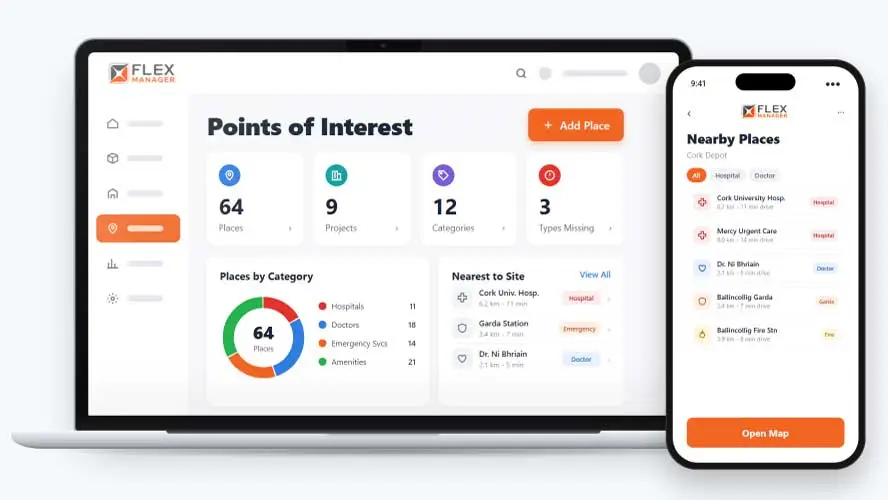
When turning a list of addresses into a usable map means looking up each location and placing it by hand, that’s a time-suck you could do without. It means teams never get around to it, ignore completing it, or the information falls out of date as sites change.
Numbers in a folder
Emergency numbers sit on a printed sheet nobody has checked since the site opened.
Guessing the distance
On a new site, nobody knows which hospital is closest or how long the drive takes.
Plans that assume
The safety plan says local services were found, with nothing to show it was done.
Key features & benefits
Pin the Nearest Emergency Services
Pin the nearest hospital, doctor, and emergency services, so the people on site know where to go, or where to send someone to, before an emergency happens.
Distance, Travel Time, and Directions
See the distance and travel time from site to each place, and get driving distance straight from the project location, without needing to look anything up separately.
Check Nothing's Missing
Check that the required location categories are covered for a project, so a gap, like no hospital pinned nearby, gets caught before it matters rather than after.
From address to safety plan
Add the places around a project once, and the map, the distances, and the safety plan check all follow from them.
Add a place
Choose the place types each site needs, and see which are missing; add a hospital, doctor, or emergency service around a project.
Distance worked out
The driving distance and travel time from the site are worked out when you save.
On the map
Drag the map pin to the exact spot. See every nearby place and the site itself on one map; click a map marker for the phone number, address, and travel time
Check the plan
Required place types are listed in the published safety plan.
See Points of Interest in action.
Bring a real case to the demo. We will build it live.
Built for every site team
From the site office to the safety team, everyone sees the same places around each project.
Site Safety Manager
Knows the nearest hospital and emergency services for each site, and how long the drive takes.
Project Manager
Sees every place around the site on one map, filtered by category, and prints the list for the site office.
Head of HSEQ
Chooses the types of place each project must have, sees which are missing, and cloned projects keep them.
HSEQ Systems Administrator
Can add and update places from other systems through the REST API.
Onboarding built around your needs. We're ready when you are.
We work to your pace and your team's availability. Your dedicated onboarding specialist takes care of the setup, so getting started stays simple.
Configuration
We configure FlexManager around your procedures.
Training
Short, role-based sessions for admins and field teams. Most users are confident after their first use.
Go Live!
Start with one site or roll out everywhere at once. Your account manager stays with you after launch.
Get started with Points of Interest








Frequently Asked Questions
Does the module guarantee help will arrive quickly in an emergency?
No. Points of Interest maps the nearest hospital, doctor and emergency services so that information is ready ahead of time, but actual response times depend on local services, distance and circumstances on the day, not on the software itself.
Can we check that a site has everything it needs mapped?
Yes. Required location categories can be checked, so a gap, such as no doctor or hospital pinned nearby, is caught while there’s still time to fix it, rather than discovered after the fact.
Can the points-of-interest map be shared or printed?
A site’s points-of-interest sheet can be exported as a PDF, so it can be printed, shared with a site induction pack, or kept on hand without needing someone to open the software to check it.
Why choose FlexManager for points of interest?
FlexManager has been building health and safety software since 2011, shaped by people with hands-on HSEQ experience, not just software developers. FlexManager is certified to ISO 9001, ISO 14001, ISO 27001 and ISO 45001 certification, and it’s that industry-backed accreditation that gives us the know-how we need.