
Every subcontractor's site history, in one place.
A site diary that only lives in one person's notebook disappears the day they're off site. FlexManager's Site Diary module records dated free-text entries against a subcontractor company on a project, viewable as a list or calendar, so activity is on record rather than remembered later.
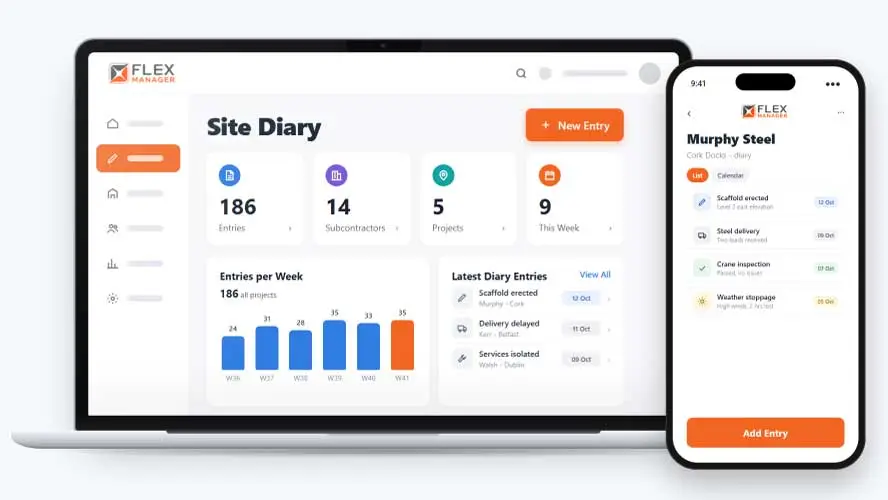
If you had to find out what happened on site on a particular day three months ago, how long would it take? Site diaries are often handwritten or kept as plain, unstructured notes that are hard to read and harder to search. Using this method means flicking through pages or scrolling through long blocks of text to get information.
Notes in a notebook
What happened on site sits in one manager's notebook, and leaves when they do.
Scattered across projects
Notes about one subcontractor are spread over every project they worked on, in different places.
Written from memory
The week gets written up on Friday, long after the day it describes.
Key features & benefits
A Dated Record for Every Project
Keep a dated diary for every project, so a record of what happened and when builds up automatically instead of living in someone's personal notes.
Organised by Contractor
Log site activity against each contractor, so it's clear at a glance which subcontractor an entry actually relates to rather than one long, mixed list.
Subcontractor Visibility
Subcontractors can see their own company's entries in their portal.
From the site to the profile
One entry, written once, shows on the project's diary and on the subcontractor's own record.
Pick the day
Click a day on the calendar or add an entry, dated today or back-dated to the day it happened.
Name the subcontractor
Choose from the subcontractors assigned to the project, then write the entry in the rich-text editor.
Author and change log
The author is recorded from the signed-in user, and recent saves show in the entry's change log.
See the history
Browse entries as a list or on a calendar.
See Site Diary in action.
Bring a real case to the demo. We will build it live.
Built for teams and administrators
From the site cabin to the commercial office, everyone reads the same dated record of each subcontractor.
Site Manager
Writes the day's diary against each subcontractor from the calendar, and back-dates an entry when the day ran late.
Commercial Manager
Opens a subcontractor's profile and reads their diary from every project before a claim, a renewal or a tender.
HSEQ Manager
With Diary admin rights, sees who wrote each entry and the recent changes in its change log.
Project Manager
Browses the diary as a list or on a calendar and, as author or admin, moves an entry logged on the wrong project.
Onboarding built around your needs. We're ready when you are.
We work to your pace and your team's availability. Your dedicated onboarding specialist takes care of the setup, so getting started stays simple.
Configuration
We configure FlexManager around your procedures.
Training
Short, role-based sessions for admins and field teams. Most users are confident after their first use.
Go Live!
Start with one site or roll out everywhere at once. Your account manager stays with you after launch.
Get started with Site Diary









Frequently Asked Questions
Can subcontractors add their own diary entries?
Yes. Subcontractors can add entries directly through their own portal, so their side of a day’s activity is recorded in their own words rather than being summarised by someone else after the fact.
Can an entry be moved if it was logged against the wrong project?
An entry can be edited or moved between projects, so a mistake in logging doesn’t mean deleting the entry and starting again, it can simply be corrected and left in the right place.
How can diary entries be reviewed later?
Entries can be browsed in a list or a calendar view, so you can either scan through activity in order or look at a specific date to see exactly what was logged that day.
Why choose FlexManager for site diaries?
FlexManager has been building workforce and plant management software since 2011, with a team that includes people who’ve actually worked on and around live projects, not just engineers. FlexManager is certified to ISO 9001, ISO 14001, ISO 27001 and ISO 45001 certification, and it’s that industry-backed accreditation that means we have the know-how we need.