
Subcontractor hours on record, project by project.
Knowing roughly how many subcontractor hours went into a project isn't the same as having an exact record. FlexManager's Subcontractor Time Records module lets you record the hours and headcount a subcontractor company works on a project by date, with list, calendar, and year-to-date summary views.
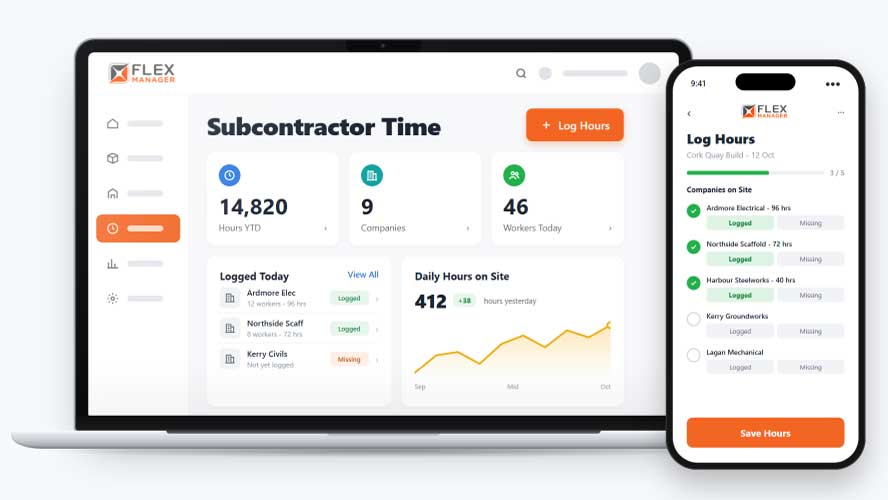
How many subcontractor workers were on your site last Tuesday, and how many hours did they put in? When time is logged in timesheets, spreadsheets, or separate forms, headcount and hours can be hard to see at a glance, and spotting a busy or quiet stretch often means piecing the numbers together by hand.
Sheets in the cabin
Headcounts are written on paper sheets that go missing before anyone adds them up.
Totals rebuilt by hand
Someone retypes every return into a spreadsheet at month end, and chases the ones that did not come.
Invoices nobody can check
When a subcontractor bills for labour, there is no record of the days to set it against.
Key features & benefits
Log Hours as They Happen
Log hours on site each day, so a day's headcount and hours are recorded as they happen rather than reconstructed from memory later.
Let Subcontractors Enter Their Own Hours
Let subcontractors enter their own hours via a portal, so the people who actually worked the day are the ones recording it, rather than someone relaying it secondhand.
Summarise Hours Over a Year
Summarise hours by month and by company over a year, so trends in subcontractor usage are visible at a glance rather than needing to be pulled together manually.
From site to yearly totals
An entry for each company, project, and day, logged by your team or the subcontractor, and added up for you.
Log the day
Pick the date, a subcontractor assigned to the project, the headcount, and the total hours.
Let subcontractors
Subcontractors with portal access log their own company's hours against any project they are linked to.
See it add up
Entries appear on the project calendar; Year-to-date hours can be seen for the project, with each company's total.
Keep it straight
Each entry keeps who posted it, even after edits have been made to it.
See Subcontractor Time Records in action.
Bring a real case to the demo. We will build it live.
Built for the teams who count the hours
From the site cabin to the commercial team, everyone reads the same hours.
Site Manager
Can see each subcontractor's headcount and hours for the day, on the project calendar.
Commercial Manager
Has year-to-date hours by company for each project, and an Excel export by project and subcontractor.
Supply Chain Manager
Sees every hour a company has logged across all projects on its profile, kept together when duplicate companies are merged.
HSEQ Manager
With admin rights, sees who posted each entry and every change made to it afterwards.
Onboarding built around your needs. We're ready when you are.
We work to your pace and your team's availability. Your dedicated onboarding specialist takes care of the setup, so getting started stays simple.
Configuration
We configure FlexManager around your procedures.
Training
Short, role-based sessions for admins and field teams. Most users are confident after their first use.
Go Live!
Start with one site or roll out everywhere at once. Your account manager stays with you after launch.
Get started with Subcontractor Time Records









Frequently Asked Questions
Can subcontractors log their own hours?
Yes. Subcontractors can enter their own hours through a portal, so the record reflects what the people who actually worked the day reported, rather than a supervisor estimating or reconstructing it afterwards.
What if hours get logged against the wrong project?
A time record can be reassigned to a different project, so a mistake in logging doesn’t mean deleting the entry and starting over, it can simply be corrected and moved to where it belongs.
Can we see hours summarised over time?
Yes. Hours can be summarised by month and by company over a year, so trends in how much a subcontractor has actually worked become visible without pulling the figures together by hand.
Why choose FlexManager for subcontractor time records?
FlexManager has been building workforce management software since 2011, with a team that includes people who’ve actually worked in operations, not just engineers. FlexManager is certified ISO 9001, ISO 14001, ISO 27001 and ISO 45001 certification, and it’s that industry-backed accreditation that means we have the know-how we need.