
Assess training your way, and keep a record.
A training assessment that lives on a clipboard until someone files it doesn't tell you much. FlexManager's Training Assessment App lets an assessor run a full practical training assessment on a mobile device, then score it, update the training record, and issue a certificate on the spot.
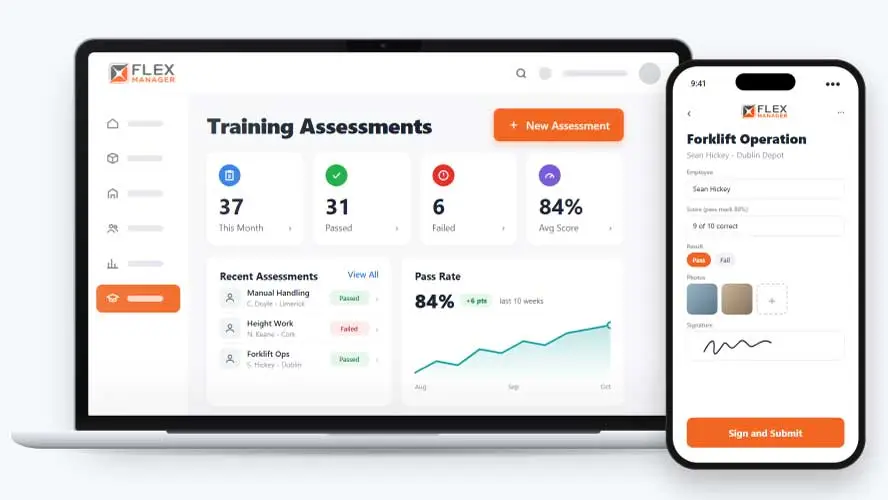
If someone questioned a worker’s competency tomorrow, could you prove when and where they were assessed, and who signed it off? Practical competency checks often happen on paper clipboards or in generic forms: when an audit, incident, or dispute comes up, a crumpled form with one signature doesn’t hold much weight.
Lost on the way back
Sheets filled in beside the machine go missing before they reach the training office.
Marked by hand
Each assessor reads the pass criteria a little differently, so the same answer can pass one day and fail the next.
Retyped into the record
Someone keys the result, certificate number and expiry date into the training system, and mistakes slip in.
Key features & benefits
Assess Competency Where the Work Happens
Run a full practical training assessment from a phone or tablet on-site, so competency gets checked exactly where the work happens instead of back at a desk after the fact.
From Score to Certificate, in One Step
Assessment answers are scored automatically as a pass or fail, the employee's training record updates the moment they pass, and a certificate is issued straight away, with no separate paperwork step in between.
Intuitive Marking
Questions marked not applicable are left out of the score.
From the yard to the record
Set the standard once, assess in the mobile app, and let a pass update the training record.
Set up
Build question sets with counts, ranges, yes/no, and single choice; set a pass mark for each practical course.
Assess
Signatures are held in a tamper-evident e-signature record; there is a map of where the assessment took place, when a location is sent.
Score
Scored answers are checked against your standard, and the result against the course pass mark.
Record
A pass goes straight onto the employee's training record; employees can be alerted to their result, pass or fail.
See Training Assessment App in action.
Bring a real case to the demo. We will build it live.
Support from field assessment to final record
From the assessor in the yard to the training office, everyone works from the same signed result.
Training Manager
Is able to review every assessment, question by question.
Workplace Assessor
Can sign on the assessment after it has been submitted by the employee.
HSEQ Manager
Can review one PDF report per assessment with its answers and signatures.
Operations Director
Knows that a pass clears that course from missing mandatory training.
Onboarding built around your needs. We're ready when you are.
We work to your pace and your team's availability. Your dedicated onboarding specialist takes care of the setup, so getting started stays simple.
Configuration
We configure FlexManager around your procedures.
Training
Short, role-based sessions for admins and field teams. Most users are confident after their first use.
Go Live!
Start with one site or roll out everywhere at once. Your account manager stays with you after launch.
Get started with Training Assessment App







Frequently Asked Questions
What happens when someone fails a mandatory training assessment?
Their supervisor is alerted immediately so the shortfall gets picked up straight away. FlexManager flags the fail and puts it in front of the right person; what happens next, whether that’s retraining or a temporary restriction on certain work, remains part of your organization’s own process.
Can I build my own assessment question sets?
Yes. You can create your own question sets using varied question types, including yes/no and ranges, and add images to both questions and answers. That means a practical assessment can be built around whatever the training actually covers, rather than being limited to a generic checklist.
Does a passed assessment update the employee's training record automatically?
Yes. When an assessment is scored as a pass, the result updates the employee’s training record and a certificate is issued, so there’s no separate step to keep the two in sync. Assessors and employees both sign off on the spot, and the location and time of the assessment are recorded alongside the result.
Why choose FlexManager for the training assessment app?
FlexManager has been building workforce and HSEQ management software since 2011, shaped by hands-on experience in the industries that rely on it, and FlexManager is certified to ISO 9001, ISO 14001, ISO 27001, and ISO 45001 certifications ourselves, meaning we have the industry-backed accreditation we need.