
Know who has read the version that is live.
When policies live in scattered folders or outdated printouts, teams end up guessing what's current. FlexManager's Policy Control module gives every employee instant access to the latest standards, controlled by department or contractor, synced across mobile and desktop, and signed off individually so adherence is never in doubt.
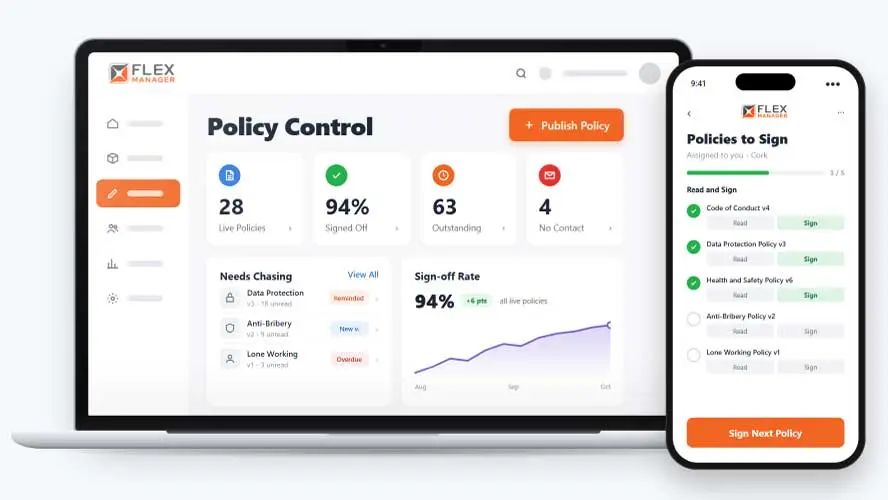
Is everyone in your organisation working from the same version of each policy? When policies are scattered across drives, inboxes, and filing cabinets, outdated versions stay in use and practices start to drift.
Email and hope
A policy goes out by email and the replies sit in somebody's inbox.
Which version?
Staff signed last year's version, and nobody can say who has read this one.
Contractors left out
Subcontractors without a company login do not see the policy at all.
Key features & benefits
Signed-Off Procedures
Keep procedures applied consistently across the team, with each staff member signing off individually once they've reviewed the current version.
Renewals
Set a renewal so policies are re-read on a cycle; helping keep everything current as you need it to be.
Documents by User Group
Control which policies employees, departments, or contractors can see, so each group only accesses the controlled documents relevant to their role.
On-Demand Availability
Give teams instant access to the policies they need, exactly when they need them, so no one is left waiting on the current version.
Mobile-to-Desktop Sync
Access essential policy documents on the go from any device, with updates syncing instantly between mobile and desktop, so field teams are never working from an outdated copy.
Controlled Version Management
Manage revisions and updates to policies centrally, so everyone works from the most current version rather than an outdated copy.
From publish to proof
One publish starts the whole cycle, from each reader's personal link to the record an auditor asks for.
Assign
Assign by employee group, project, or subcontractor type.
Publish
Publish policies to the people they apply to.
Read and sign
Readers reach the end of the document, confirm and sign, and the record keeps the version.
Track
See who has read, who must read again, and who has not.
See Policy Control in action.
Bring a real case to the demo. We will build it live.
Built for the teams who own compliance
From the safety team to the line manager, everyone works from the same record of who has read what.
HSEQ Manager
Sends each safety policy to the right groups, sites, and contractor types; sees who still owes a read.
HR Manager
Holds a signed acknowledgement for each person, tied to the version of the policy they read.
Document Controller
Approves a document in Document Control and it is published into Policy Control, where they set who must read it.
Operations Director
Can change who must read a live policy without republishing it.

Irish Dog Foods
FlexManager was brought in to streamline the manual processes with a centralised digital system for managing quality, health and safety, and providing operational oversight. FlexManager supported business expansion while maintaining high quality standards, helping achieve significant compliance across core policies and procedures.
Onboarding built around your needs. We're ready when you are.
We work to your pace and your team's availability. Your dedicated onboarding specialist takes care of the setup, so getting started stays simple.
Configuration
We configure FlexManager around your procedures.
Training
Short, role-based sessions for admins and field teams. Most users are confident after their first use.
Go Live!
Start with one site or roll out everywhere at once. Your account manager stays with you after launch.
Get started with Policy Control










Frequently Asked Questions
What is FlexManager's Policy Control module?
Policy Control is FlexManager’s module for managing company policies and procedures in one place. It gives every employee on-demand access to the current version of each policy, with documents controlled by department or contractor group and signed off individually so adherence to the current standard is clear.
How does Policy Control keep everyone using the current version?
Policy Control uses version management to keep every update centralized, so when a policy changes, the previous version is replaced rather than left circulating alongside it. That means employees and contractors are always working from the current standard rather than an outdated copy someone forgot to update.
Can I control who sees which policies?
Yes. Policies can be set by department or as a contractor, so each group only sees the controlled documents relevant to them. This keeps site-specific or role-specific procedures from being mixed in with policies that don’t apply to a given team.
Can policies be accessed on mobile devices?
Yes. Policy Control is accessible on both mobile and desktop, with updates syncing instantly between the two. That means a policy update made centrally is reflected on a worker’s phone in the field just as quickly as it appears on an office desktop.
Does Policy Control help align with standards like ISO or OSHA?
Policy Control lets you align policies to the standards relevant to your business, whether that’s ISO, OSHA or your own site-specific best practices, and apply them consistently across every location. Keeping policies aligned to recognized standards and current internally is one part of a broader compliance programme.
How does staff sign-off work?
Each staff member signs off on a policy individually once they’ve reviewed it, rather than the whole team being marked as compliant at once. That creates a clear, individual record of who has acknowledged the current version of a given procedure, and who still needs to.
Why Trust FlexManager for Policy Control?
FlexManager has supported HSEQ and quality teams since 2011, built by people with hands-on experience running compliance and safety programmes rather than software design alone. FlexManager is certified to ISO 9001, ISO 14001, ISO 27001 and ISO 45001 certification, so the sign-off and version-control discipline built into Policy Control mirrors document-control practices FlexManager also applies to its own management systems.