
Chase subcontractor insurance before it runs out.
A subcontractor's insurance lapsing without anyone noticing is a risk that's entirely avoidable. FlexManager's Subcontractor Control Details module tracks the compliance requirements each subcontractor must satisfy, such as insurance certificate expiry dates or policy confirmations, with submission, review, and automatic expiry handling built in.
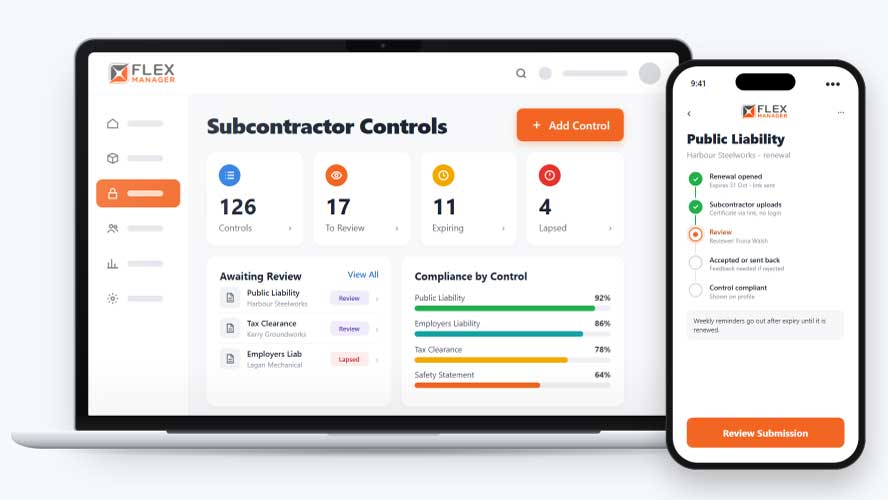
Keeping track of subcontractor compliance is hard when every trade needs different documents. Expiry dates and reference numbers end up spread across emails and spreadsheets, and nobody can easily see what’s due for renewal next month until it has already lapsed. That’s a challenge for everyone.
Certificates in inboxes
Each certificate lives in a different mailbox or folder, so nobody can say which are current.
Expiry dates in a spreadsheet
Someone has to remember to check the list, and the list is only as good as the last update.
Renewals chased by phone
Getting a new certificate means calls and emails, and the chasing stops when that person is busy.
Key features & benefits
Know Who's Covered
Track whether each subcontractor has valid insurance and policies in place, so a gap in cover is visible before it becomes a problem on site.
Get Reminders to Submit Renewal
Get weekly reminders after expiry until the renewal is submitted.
Submit, Then Verify
Let subcontractors submit their own compliance evidence, then review and accept or reject what's submitted, so evidence is checked by your team rather than taken on trust alone.
From requirement to renewal
Set the rule once per subcontractor type, and every company of that type gets the controls, the links and the reminders.
Set the controls
Choose what each subcontractor type must meet: a date, a yes or no policy check, or a reference.
Submit by link
The subcontractor opens a link or QR code, enters the value and uploads the document.
Review
Your reviewer accepts it, or rejects it with feedback, for good or for resubmission.
Renew
Renewal opens before a certificate expires, with a link to it.
See Subcontractor Control Details in action.
Bring a real case to the demo. We will build it live.
Built for teams and reviewers
From the person who checks the certificates to the manager signing off the crew, everyone sees the same control status.
Contractor Compliance Manager
Sets the controls per type and can review submissions in a batch.
Head of HSEQ
Is able to carry out a search of controls by company, value, or status, before then exporting or printing.
Project Manager
Can see a red or green icon for control values on a risk assessment.
Procurement Lead
Gets renewals chased by link before the date runs out, and weekly reminders after it, without phoning round.
Onboarding built around your needs. We're ready when you are.
We work to your pace and your team's availability. Your dedicated onboarding specialist takes care of the setup, so getting started stays simple.
Configuration
We configure FlexManager around your procedures.
Training
Short, role-based sessions for admins and field teams. Most users are confident after their first use.
Go Live!
Start with one site or roll out everywhere at once. Your account manager stays with you after launch.
Get started with Subcontractor Control Details










Frequently Asked Questions
Does marking a subcontractor as compliant mean they're legally compliant?
The compliant status in the module reflects whether the evidence a subcontractor has submitted, such as an insurance certificate or policy confirmation, has been reviewed and accepted by your team. It’s a record of what’s been submitted and checked internally, not an independent legal or regulatory determination.
Can subcontractors submit their own evidence?
Yes. Subcontractors can submit their own compliance evidence directly, and your team reviews it, accepting or rejecting what’s submitted, so the evidence still gets checked rather than being accepted automatically just because it was uploaded.
What happens when a requirement expires?
An out-of-date requirement expires automatically, and you’re warned before a certificate reaches its expiry date, so a lapsed requirement is flagged ahead of time rather than only being noticed once it’s already out of date.
Why choose FlexManager for subcontractor control details?
FlexManager has been building compliance and safety software since 2011, with hands-on HSEQ experience behind the team, not just software developers. FlexManager is certified to ISO 9001, ISO 14001, ISO 27001 and ISO 45001 certification, and it’s that industry-backed accreditation that means we have the know-how we need.