
Approve the right amount, with the reason on record.
A stack of paper receipts and a spreadsheet formula for mileage is no one's idea of a good process. FlexManager's Expenses module lets employees submit claims online with receipts attached, calculate mileage and allowances automatically, route them for approval, and export everything approved straight to a spreadsheet.
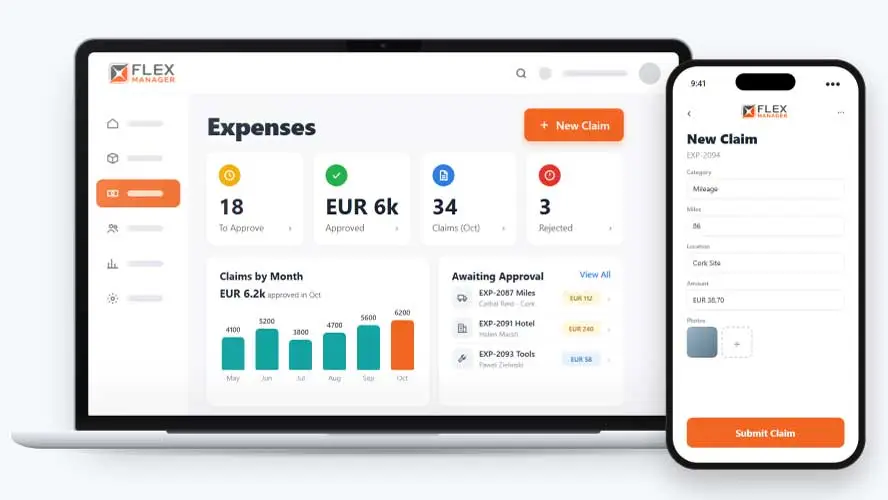
Expense claims are often slow and frustrating for everyone involved. With paper forms or spreadsheets, receipts, and claims sitting in inboxes, employees wait longer to be reimbursed, and the business has a weak audit trail.
Receipts in the glovebox
Receipts arrive late, crumpled or not at all, and the claim cannot be checked.
Mileage by guesswork
Distances are rounded up and multiplied by hand, at whatever rate the claimant remembers.
Rekeying at month end
Finance types every approved claim into a spreadsheet, and nobody can say why a figure was paid.
Key features & benefits
Automatic Mileage & Allowance Calculation
Calculate mileage and per-day allowances automatically, rather than having someone work out the maths on every single claim by hand.
Bulk Approval
Approve or reject claims in bulk, so a supervisor isn't clicking through dozens of individual claims one at a time.
Export for Payment
Export approved expenses to a spreadsheet for payment, moving straight from approval to payroll without re-keying anything a second time.
From receipt to processed
One claim carries the receipt, the decision, and the payment record, so everyone sees the same figure.
Claim
Staff claim and track their own expenses; they can attach a receipt or document to each claim.
Review
The supervisor or central approver can approve or reject a batch of claims at once.
Process
Approved claims are processed and exported to Excel in one step.
Track
Monthly and annual expense totals can be seen on every employee profile.
See Expenses in action.
Bring a real case to the demo. We will build it live.
Made for employees, supervisors, and finance teams
From the person claiming to the team paying it, everyone works from the same claim and the same figure.
Finance Manager
Can see exports linked to receipts; colour-coded categories, with finance codes in the export.
Line Supervisor
Reviews the team's claims, and can approve a batch or adjust amounts.
Lead Auditors
Knows that every change to a claim is kept in the audit trail.
Project Manager
Sees every approved claim coded to the location; provides insights on which projects are making more expense claims.
Onboarding built around your needs. We're ready when you are.
We work to your pace and your team's availability. Your dedicated onboarding specialist takes care of the setup, so getting started stays simple.
Configuration
We configure FlexManager around your procedures.
Training
Short, role-based sessions for admins and field teams. Most users are confident after their first use.
Go Live!
Start with one site or roll out everywhere at once. Your account manager stays with you after launch.
Get started with Expenses










Frequently Asked Questions
What is FlexManager's Expenses module?
Expenses is FlexManager’s module for submitting and approving employee expense claims. Claims are submitted online with receipts attached, routed through supervisor or central approval, and once approved, exported to a spreadsheet for payment and marked processed in one step.
How are mileage and allowances calculated?
Mileage and per-day allowances are calculated automatically based on the expense categories and rates you set up. This removes the need for someone to work out the maths manually on every claim, and keeps allowances consistent across the whole team.
Can I approve multiple claims at once?
Yes. Claims can be approved or rejected in bulk, so a supervisor reviewing a stack of claims doesn’t need to open and process each one individually. This is particularly useful when several claims come in around the same time, such as after a trip or project.
Why choose FlexManager for expenses?
FlexManager has helped HR and finance teams process expense claims since 2011, aware that a claims process only works if employees trust it’ll be handled fairly and finance trusts the numbers going to payment. FlexManager is certified to ISO 9001, ISO 14001, ISO 27001 and ISO 45001 certification, and it’s that industry-backed accreditation that gives us the know-how we need.