
Log your non-conformances, through to the fixes that resolve them.
An incident that's reported quickly and completely gives you a much better chance of understanding what happened and preventing it again. FlexManager's Non Conformance Reporting module gives you a way to capture the event, the people involved, any costs, and the follow-up actions needed, then tracks the whole thing through review to closure.
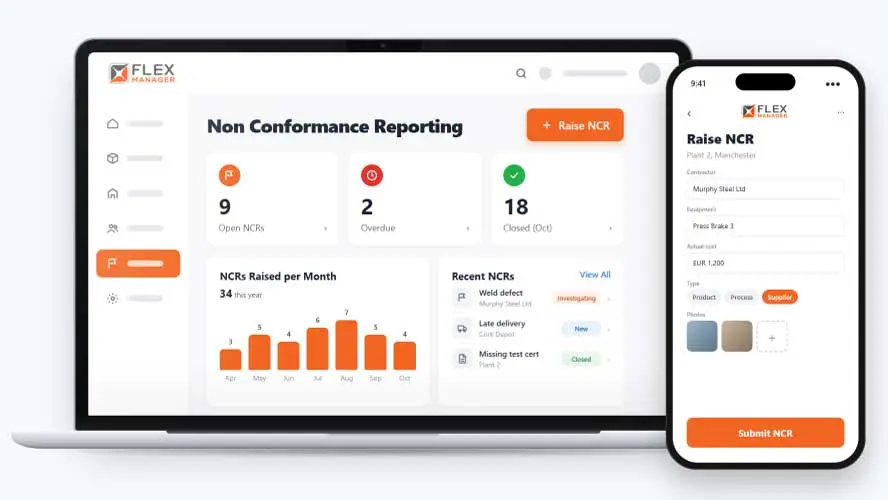
When an incident happens, the details are often spread across emails, spreadsheets, and phone camera rolls. Without a consistent way to classify incidents by type and sub-type, spotting trends is close to impossible.
Notes nobody reads again
A defect is written on a form or a spreadsheet row, and nobody looks at it again.
Fixes without an owner
The agreed corrective action lives in an email, and nobody checks that it was done.
No trail for the auditor
When an auditor asks, the cost, the contractor and the proof of the fix are hard to find.
Key features & benefits
Report an Incident Step by Step
Report a job incident so that non-conformances are noted down and can ultimately be actioned.
See if Training Was Up to Date
See the involved employee's training as it stood on the day; determine if they were compliant.
Close the Loop With Corrective Work Orders
Raise corrective work orders directly from an incident, and require them to close before the incident can be signed off, so a finding can't be filed away before it's actually addressed.
From defect to fix
One record carries the non-conformance from the first report to the corrective work that closes it.
Report
Your team reports from the web or their personal portal, with photos of what they found.
Record
Work through each section: your own checklists, the contractor involved, the equipment, and costs.
Review
Auto-assign an investigation owner, or their delegate when away.
Fix
Corrective work orders are raised from the report, and it closes itself once they are done.
See Non Conformance Reporting in action.
Bring a real case to the demo. We will build it live.
Built for every site team
From the supervisor who finds the defect to the director who reviews the cost, everyone works from the same record.
Quality Manager
Builds their very own checklists, pick lists, and yes or no checks.
Site Supervisor
Can be set as owner while a report is under investigation, sees the employee's training on the day, and raises the corrective work orders.
Contracts Manager
Records the contractor involved and is able to search by company and can flag equipment involved.
Operations Director
Can search and chart non-conformances across all your projects.

Irish Dog Foods
FlexManager was brought in to streamline the manual processes with a centralised digital system for managing quality, health and safety, and providing operational oversight. Irish Dog Foods implemented the Non-Conformance Reporting module that helped them track non-conformance for certification purposes.
Onboarding built around your needs. We're ready when you are.
We work to your pace and your team's availability. Your dedicated onboarding specialist takes care of the setup, so getting started stays simple.
Configuration
We configure FlexManager around your procedures.
Training
Short, role-based sessions for admins and field teams. Most users are confident after their first use.
Go Live!
Start with one site or roll out everywhere at once. Your account manager stays with you after launch.
Get started with Non Conformance Reporting










Frequently Asked Questions
What happens to an incident once it's reported?
Once an incident is logged, it moves through a review and sign-off workflow that you can customise, with any corrective work orders raised against it needing to close before the incident is signed off. That means a report leads to a tracked outcome, not just a filed record.
How does the module handle injury details?
An injury can be pinpointed on a clickable body diagram. This gives a fuller, more specific record to work from, though it doesn’t replace your organisation’s own medical or regulatory reporting obligations.
Can witnesses add their own account of what happened?
Yes. Witness statements can be captured as part of an incident, and witnesses can be invited to sign off on their own account, so a report reflects more than one person’s perspective on what took place.
Why choose FlexManager for non conformance reporting?
FlexManager has been building health, safety and quality software since 2011, shaped throughout by people with direct HSEQ experience, not just developers working from a brief. FlexManager is certified to ISO 9001, ISO 14001, ISO 27001 and ISO 45001 certification, and it’s that industry-backed accreditation that gives us the know-how we need.