
Finish the session. Everyone who attended is on record.
A face-to-face induction is only as good as the record it leaves behind. FlexManager's On-Site Orientation module can run facilitator-led sessions against a project, build an attendee roster, capture confirmation checks and signatures, and produce a completion record for everyone who actually attended.
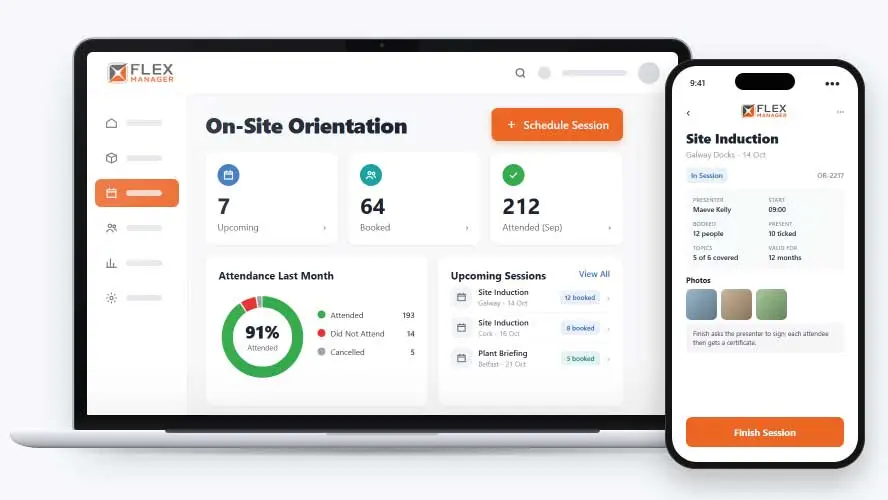
When site inductions depend on a clipboard at the door, that’s a challenge. It can mean names are hard to read, people sign on behalf of others, and the sheets have to be typed up later, if they get typed up at all. That makes it hard to see who has been inducted for which job.
Sheets in the site office
The only proof of an induction is a signature on paper, filed somewhere on site.
Names nobody can read
Handwritten names and missing surnames make it hard to match a sheet to a person.
No-shows go unnoticed
Someone booked on the induction skips it, and nobody notices until they are already working.
Key features & benefits
Build a Full Attendee Roster
Run face-to-face induction sessions on site, and build an attendee roster covering staff, subcontractors, and visitors, so everyone expected to be in the room is accounted for.
Capture Presenter and Attendee Signatures
Capture a presenter signature for the session, along with attendee signatures on site, so there's a signed record of who actually delivered and attended the induction.
Know Exactly Who Attended and Who Didn't
Produce a completion record for everyone who attended, and mark who did not attend a booked session, so a gap in someone's induction is visible rather than assumed away.
From roster to record
Plan the session against a project, run it on the day, and the records follow from what you tick.
Schedule
Schedule face-to-face site inductions against a project; attendees get a calendar invite that updates if the session moves.
Build the roster
Add attendees by name, user role, staff group, or project roster.
Run it
On the day, tick the topics covered, and the presenter signs on screen to finish; anyone booked who did not attend is marked automatically.
Finish
Each attendee gets an induction record and certificate.
See On-Site Orientation in action.
Bring a real case to the demo. We will build it live.
Built for facilitators and planners
From the safety team to the subcontractor's own workers, everyone works from the same session record.
HSEQ Manager
Has a signed attendance record and a certificate for each attendee when an auditor asks.
Site Manager
Runs the induction from a roster on the day, and Finish marks who did not turn up.
Training Coordinator
Schedules sessions, builds rosters, and attendees get calendar invites that keep up with changes.
Subcontractor Manager
Knows that subcontractor workers see their sessions in their portal.
Onboarding built around your needs. We're ready when you are.
We work to your pace and your team's availability. Your dedicated onboarding specialist takes care of the setup, so getting started stays simple.
Configuration
We configure FlexManager around your procedures.
Training
Short, role-based sessions for admins and field teams. Most users are confident after their first use.
Go Live!
Start with one site or roll out everywhere at once. Your account manager stays with you after launch.
Get started with On-Site Orientation







Frequently Asked Questions
What happens if someone doesn't show up to a booked session?
The module marks anyone who did not attend a booked session, so a no-show is recorded rather than assumed to have been inducted, and it’s clear at a glance who still needs to be booked onto another session.
Can the number of attendees at a session be limited?
Yes. Places on a scheduled session can be capped, so a room or induction area doesn’t end up overbooked, and once a session is full, further attendees can be booked onto the next available one.
What record is produced once a session is delivered?
Each session produces a completion record for everyone who attended, backed by a presenter signature, attendee signatures, confirmation checks and a record of where the session physically took place, so there’s a full picture of exactly what was delivered and to whom.
Why choose FlexManager for on-site induction?
FlexManager has been building health and safety software since 2011, shaped by hands-on HSEQ experience, not just software development. FlexManager is certified to ISO 9001, ISO 14001, ISO 27001 and ISO 45001 certification, and it’s that industry-backed accreditation that gives us the know-how we need.