
Schedule, track, and certify your workers’ training.
A course that's fully booked on a spreadsheet but not reflected anywhere else doesn't help anyone plan around it. FlexManager's Training Courses module means that you can schedule classroom and instructor-led sessions, track who attended and who passed, and update the training record and certificate automatically once a course completes.
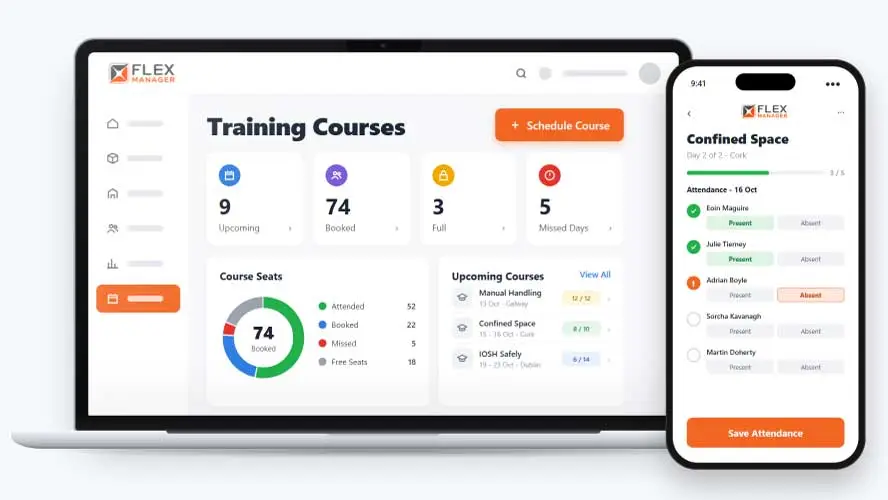
How many people missed a course because nobody reminded them, or turned up without the materials they needed? Training is often arranged through emails, spreadsheets, and separate provider bookings, so course documents get lost and details are scattered from booking to completion.
Paper sign-in sheets
Attendance sits in a folder until someone retypes it into the training matrix.
Bookings by email
Invites go out by hand, and nobody checks the person ever held the original course.
Missed sessions
A no-show is noticed weeks later, when the certificate is not there.
Key features & benefits
Book, Schedule, and Send the Invite in One Place
Schedule classroom and instructor-led training sessions, book employees onto upcoming courses, and send calendar invites automatically, so a course goes from planned to booked without separate emails and spreadsheets.
Attendance That Doesn't Get Lost, Even Across Multiple Days
Track who attended and who passed, run multi-day courses with day-by-day attendance, and flag anyone who didn't turn up, so a no-show gets noticed instead of quietly falling through the cracks.
From Pass to Certificate, Automatically
The moment someone completes a course, their training record updates automatically, and a certificate is issued when they pass, so there's no separate step to keep attendance and qualifications in sync.
From booking to training record
One course run takes people from a calendar invite to an up-to-date training record.
Schedule
Schedules classroom courses over one or more days.
Book
Add your own staff and subcontractors. Bookings made email a calendar invite, and renewal bookings check the original course is held by the worker.
Attend
Attendance recorded for each day of a multi-day course; nobody can pass a course they did not attend.
Record
Each pass writes the person's training record in Training Manager.
See Training Courses in action.
Bring a real case to the demo. We will build it live.
Visibility for everyone running training
From the training office to the site supervisor, everyone works from the same course record.
Training Coordinator
Schedules multi-day courses, books staff and subcontractors, and closes each course straight into training records.
HSEQ Manager
Knows each pass is on the training record with any expiry date, and the certificate where one is issued.
Site Supervisor
Hears when someone in the team misses a course day, and sees missed days on their profile.
Course Owner
Prints each day's attendance list, records attendance and passes, and closes the course into training records.

Combilift
After implementing FlexManager into their workflows, CombiLift’s on-site training increased as training courses for employees and sub-contractors were recorded and carried out through the FlexManager system.
Onboarding built around your needs. We're ready when you are.
We work to your pace and your team's availability. Your dedicated onboarding specialist takes care of the setup, so getting started stays simple.
Configuration
We configure FlexManager around your procedures.
Training
Short, role-based sessions for admins and field teams. Most users are confident after their first use.
Go Live!
Start with one site or roll out everywhere at once. Your account manager stays with you after launch.
Get started with Training Courses










Frequently Asked Questions
Can I run training with providers outside our organization?
Yes. Training Courses supports both internal and external course providers, so you can run sessions delivered by your own trainers or bring in an outside provider, and manage the booking, attendance, and records the same way either time.
What happens if someone doesn't turn up to a scheduled course?
They’re flagged as a no-show, so a missed session gets recorded and followed up rather than just disappearing from view. Attendance is tracked per person for every course, including multi-day courses where turning up on day one doesn’t guarantee credit for the whole course.
Does completing a course automatically update an employee's training record?
Yes. When an attendee completes a course, their training record updates automatically and a certificate is issued, so the two never fall out of step. You can also report on training hours by course or by project, giving you a record of the time invested as well as the outcome.
Why choose FlexManager for training courses?
FlexManager has been helping organizations manage their workforce and HSEQ obligations since 2011, and we’re proud to continue doing this. FlexManager is certified to ISO 9001 for quality management, alongside ISO 14001, ISO 27001, and ISO 45001, and it’s this industry-backed accreditation that means we have the know-how.