
Score every subcontractor, on every project, the same way.
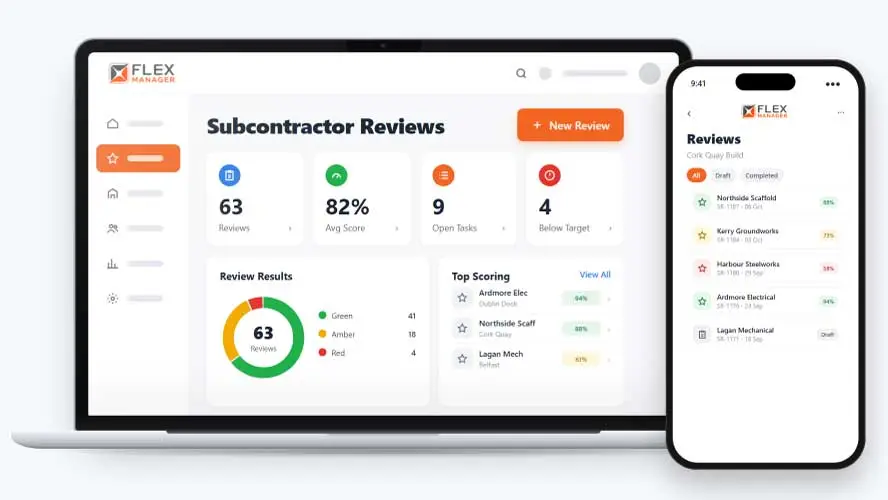
Knowing a subcontractor is "doing fine" isn't the same as having a score you can actually compare and act on. FlexManager's Subcontractor Review Report module lets an internal reviewer score a subcontractor on a project against weighted question sections, producing an overall colour-coded performance rating.
Are your subcontractor reviews based on clear scores, or on whoever wrote the notes that day? When reviews rely on free-text opinions, one reviewer’s “fine” is another’s “excellent”, so results can’t be compared fairly across subcontractors or over time.
Opinions, not scores
One manager says fine, another says poor, and nobody can show why.
Problems that repeat
The same contractor lets down a third project because nobody joined the dots.
Findings with no follow-up
Issues are agreed after a poor job and forgotten before the next one starts.
Key features & benefits
Score Performance Against Weighted Areas
Score how a subcontractor is performing on a project, rating them against weighted review areas rather than relying on a single, general impression.
See the Rating at a Glance
Get an overall colour-coded performance rating, so you can tell how a subcontractor is doing at a glance without reading through every individual answer.
See a League Table
Rank your best and worst suppliers by average review score; see a project league table of average subcontractor review scores.
From review to follow-up
Set the questions once, then every review on every project is scored, coloured, and followed up the same way.
Set up
Score every subcontractor against the same weighted question sections.
Score
Scores turn red, amber, or green against thresholds you set.
See
See every completed review on the subcontractor's profile, across all projects.
Act and share
Raise linked tasks from a review to fix what it found; share a PDF review report with answers, comments, and linked tasks.
See Subcontractor Review Report in action.
Bring a real case to the demo. We will build it live.
From first review to full history
From the site to the supply chain team, everyone judges subcontractors on the same questions and sees the same scores.
Supply Chain Manager
Sees the best and worst suppliers ranked by average score, and every review on each profile.
Project Manager
Is able to name each point of the zero-to-five scale, their way.
HSEQ Manager
Can reopen a completed review to correct it; key changes are logged for transparency.
Commercial Director
Has the PDF report of each review, and a log of its status and score changes.

Galway Fire Service
Secure, role-based access allowed contractors to complete assigned inspections on site, with findings instantly available which eliminated potential wait times and the re-entering of data into local systems.
Onboarding built around your needs. We're ready when you are.
We work to your pace and your team's availability. Your dedicated onboarding specialist takes care of the setup, so getting started stays simple.
Configuration
We configure FlexManager around your procedures.
Training
Short, role-based sessions for admins and field teams. Most users are confident after their first use.
Go Live!
Start with one site or roll out everywhere at once. Your account manager stays with you after launch.
Get started with Subcontractor Review Report








Frequently Asked Questions
Does the colour-coded rating reflect an objective standard?
The rating reflects your own weighted review areas and your own pass, warning and fail thresholds, scored by an internal reviewer. It’s a consistent way to compare subcontractor performance against your own criteria, not an independent or industry-wide benchmark.
Can a subcontractor see their own review results?
Yes. Review results can be shared directly with the subcontractor, and they can view their own reviews through a portal, so feedback isn’t limited to a conversation that only one side remembers accurately.
Can the review criteria be adjusted for different types of work?
Review sections, weights and colours can all be tailored, so a review genuinely reflects what matters for a particular type of subcontractor or project rather than using one fixed set of questions for everyone.
Why choose FlexManager for subcontractor review report
FlexManager has been building workforce and quality management software since 2011, with hands-on HSEQ and operations experience behind the team, not just software developers. FlexManager is certified to ISO 9001, ISO 14001, ISO 27001 and ISO 45001 certification, and it’s that industry-backed accreditation that means we have the know-how we need.